Every app you love. Every website that feels effortless to use. Every checkout process that takes you from browsing to buying without frustration. Behind every great digital experience is intentional, skilled UX/UI design.
UX/UI design is one of the fastest-growing and highest-paid fields in the digital industry. Yet for many beginners — whether you are a web developer, a business owner, or someone exploring a career change — the difference between UX and UI design can be confusing, the terminology overwhelming, and the process unclear.
In this complete, beginner-friendly guide, you will learn exactly what UX design and UI design are, the crucial differences between them, the UX/UI design process, essential tools, career opportunities, salary ranges, and why UX/UI design is critically important for websites, apps, and digital businesses in 2026.
Table of Contents
What Is UX Design? (Definition)

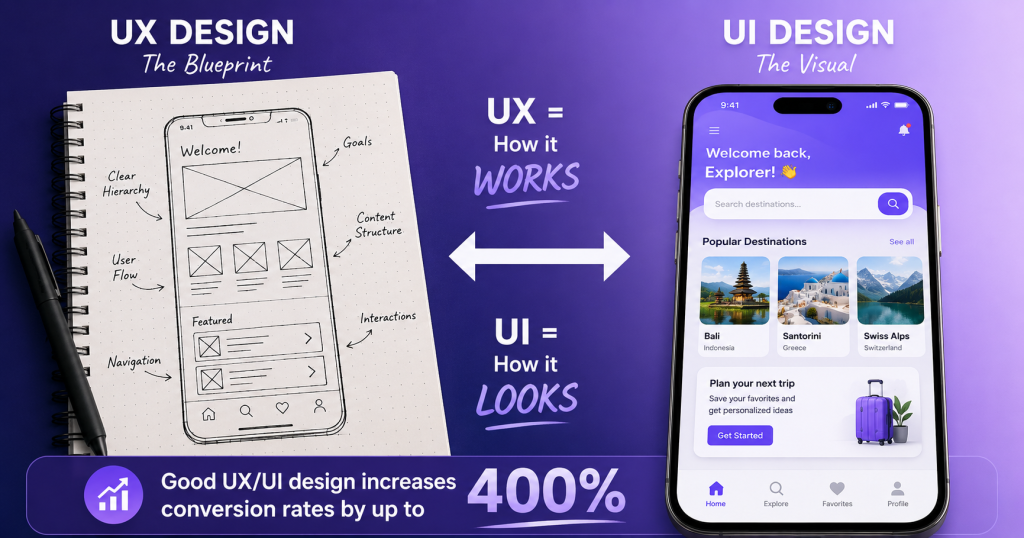
UX stands for User Experience. UX design is the process of designing digital products (websites, apps, software) so that they are useful, easy to use, and enjoyable for the people who use them.
UX design is not primarily about how something looks — it is about how it works. It is about understanding who the users are, what they need to accomplish, what problems they face, and designing a product that makes the entire experience as smooth, intuitive, and satisfying as possible.
Simple Definition:
UX design is the practice of creating digital products that are easy, enjoyable, and intuitive to use — by deeply understanding users’ needs, behaviours, and frustrations.
Technical Definition:
UX design is a human-centred design discipline that encompasses research, strategy, information architecture, interaction design, usability testing, and iteration — all aimed at creating positive, efficient, and meaningful experiences for users interacting with digital products.
The Best Analogy:
UX design is like the architecture and floor plan of a building. A brilliant floor plan ensures rooms are logically placed, traffic flows naturally, exits are accessible, and the building serves its purpose perfectly — even before a single coat of paint is applied. UX design is the ‘blueprint’ of a digital product.
What Is UI Design? (Definition)

UI stands for User Interface. UI design is the process of designing the visual, interactive layer of a digital product — everything the user actually sees and clicks on. It transforms a functional UX wireframe into a visually beautiful, polished, and consistent interface.
Simple Definition:
UI design is the practice of designing every visual element a user sees and interacts with — colours, typography, buttons, icons, layouts, animations, and imagery — to create an attractive and consistent visual experience.
Technical Definition:
UI design is the discipline of designing graphical interfaces for digital products, encompassing visual design principles (colour theory, typography, layout), interaction patterns, component design, design systems, and accessibility compliance — translating UX wireframes into production-ready visual designs.
The Best Analogy:
If UX design is the floor plan of a building, UI design is the interior design — the paint colours, furniture, lighting, artwork, and décor that make the space beautiful, inviting, and pleasing to spend time in.
UX vs. UI Design — The Key Differences
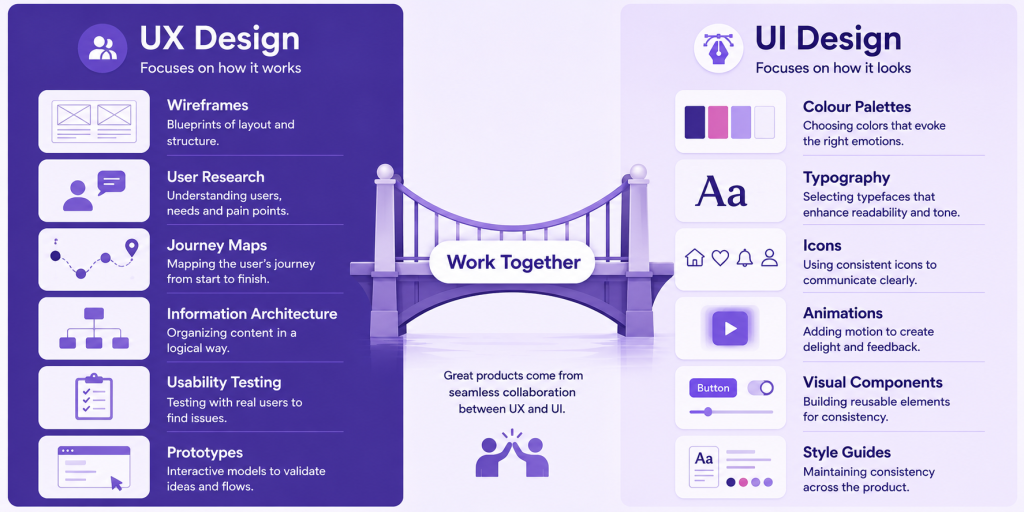
The UX vs. UI distinction is one of the most common points of confusion in the design industry. Here is a comprehensive comparison:
| Factor | UX Design | UI Design |
|---|---|---|
| Focus | How the product works and feels | How the product looks and appears |
| Primary Goal | Make the product useful, easy, satisfying | Make the product beautiful, consistent, appealing |
| Core Activities | Research, wireframing, user testing | Visual design, typography, colour, animations |
| Deliverables | User personas, journey maps, wireframes, prototypes | Style guides, UI components, mockups, design systems |
| Tools | Miro, Maze, Hotjar, UsabilityHub | Figma, Adobe XD, Sketch, Framer |
| Overlap | Information architecture, interaction design | Micro-interactions, component states |
| Analogy | Building architecture and floor plan | Interior design and decoration |
| User Impact | Determines usability and satisfaction | Determines aesthetic appeal and brand perception |
| Output | Low-fidelity wireframes and flows | High-fidelity, pixel-perfect visual designs |
The Most Important Point: UX and UI are not competing disciplines — they are complementary. Great products need both excellent UX (how it works) and excellent UI (how it looks). A beautiful UI on a poorly designed UX still leads to a frustrating product. A perfectly functional UX with poor UI still feels untrustworthy and unprofessional.
How UX and UI Design Work Together
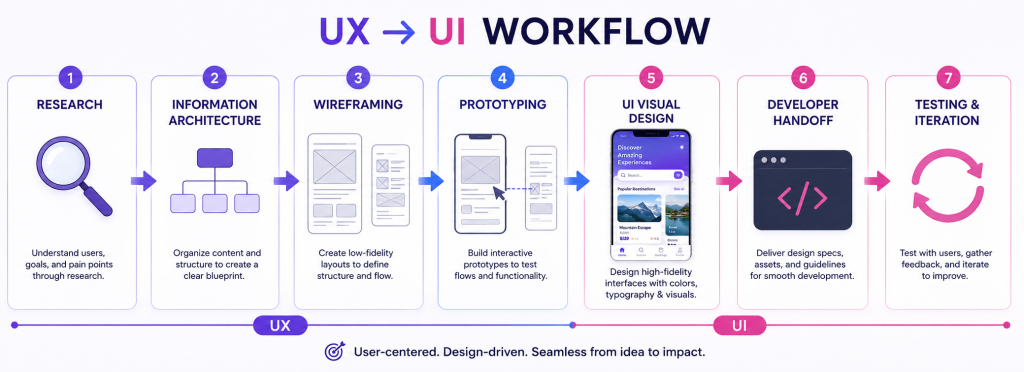
In a real-world design process, UX and UI work in a sequential but overlapping manner:
- UX Research & Discovery: Understanding users through interviews, surveys, competitor analysis, and analytics. Who are the users? What are their goals? What frustrates them?
- Information Architecture: Organising the product’s content and features into a logical structure — sitemaps, navigation flows, content hierarchies.
- Wireframing (UX): Creating low-fidelity blueprints — simple, black-and-white sketches or digital wireframes that define the layout, structure, and flow of each screen without any visual styling.
- Prototyping (UX): Building interactive, clickable prototypes from wireframes to test user flows before any visual design begins.
- Usability Testing (UX): Testing the prototype with real users to identify problems, confusion points, and opportunities for improvement.
- Visual Design (UI): Once the UX is validated, UI designers bring the wireframes to life — applying colour, typography, imagery, icons, and animations.
- Design System Creation (UI): Building a reusable library of UI components (buttons, forms, cards, navigation) that ensures visual consistency across the entire product.
- Developer Handoff: Providing developers with production-ready design files, specifications, and assets. Tools like Figma allow automatic generation of CSS code.
- Testing & Iteration: After launch, data from real users (heatmaps, session recordings, analytics) informs continuous design improvements.
The UX Design Process — Step by Step
The UX design process follows a structured, iterative methodology. The most widely used framework in 2026 is the Double Diamond Design Process:
| Phase | Goal | Activities & Methods |
|---|---|---|
| Discover | Understand the problem deeply | User interviews, surveys, contextual inquiry, competitive analysis, analytics review |
| Define | Define the right problem to solve | User personas, empathy maps, customer journey maps, problem statements, ‘How Might We’ questions |
| Develop | Explore and create multiple solutions | Brainstorming, sketching, wireframing, prototyping, design sprints |
| Deliver | Refine and deliver the best solution | Usability testing, A/B testing, design handoff, implementation support, post-launch analysis |
Key UX Design Activities
User Research
User research is the foundation of UX design. Without understanding real users, designers risk creating products based on assumptions rather than evidence. Common research methods include user interviews, usability tests, surveys, card sorting, and analytics analysis.
User Personas
A persona is a semi-fictional representation of an ideal user based on research data. Personas give the design team a shared understanding of who they are designing for — their goals, frustrations, behaviours, and context.
Customer Journey Maps
A journey map visualises the complete experience a user has with a product — from first awareness to post-purchase interaction. It identifies emotional highs and lows, pain points, and opportunities for improvement.
Wireframes
Wireframes are simple, low-fidelity sketches of screens — showing layout and structure without visual styling. They are the ‘blueprints’ of a digital product and allow rapid iteration before investing in visual design.
Usability Testing
Usability testing involves observing real users as they try to complete tasks using a prototype or live product. It reveals where users get confused, frustrated, or lost — providing evidence for design decisions.
Core UX Design Principles

1. Useful
The product must serve a genuine need. If users cannot accomplish their goal with your product, no amount of beautiful design will save it. UX design starts with asking: ‘Does this product do something people actually need?’
2. Usable
Users should be able to accomplish their tasks efficiently, without confusion or frustration. Usability means: Is the navigation clear? Are the most important actions obvious? Do interactions feel intuitive?
3. Findable
Content and features must be easy to locate. Users should not have to hunt for information. Good information architecture, clear navigation, and effective search functionality are essential for findability.
4. Credible
Users must trust the product and the organisation behind it. Trust is built through professional design, clear communication, transparent policies, security indicators (HTTPS, trust badges), and social proof (reviews, testimonials).
5. Accessible
Digital products must be usable by people with disabilities — including visual, auditory, motor, and cognitive impairments. Web accessibility (WCAG 2.2 standards) is both a moral imperative and increasingly a legal requirement in many countries.
6. Delightful
The best products go beyond usability to create moments of unexpected pleasure — a clever micro-interaction, a personalized message, a smooth animation. Delight transforms a product users need into a product they love.
Core UI Design Principles
UI design follows established visual design principles that create consistency, clarity, and aesthetic appeal:
| Principle | What It Means | Design Application |
|---|---|---|
| Visual Hierarchy | Organise elements by importance | Larger headings, contrasting colours, bold CTAs draw attention first |
| Consistency | Similar elements look and behave alike | Same button styles, colours, font sizes across all screens |
| Contrast | Differentiate elements through colour/size | High text-to-background contrast for readability; accessible ratios |
| Alignment | Elements are precisely positioned | Grid systems, consistent margins and padding |
| White Space | Empty space around elements | Prevents clutter; improves readability and elegance |
| Colour Theory | Strategic use of colour | Brand colours, semantic colours (red=error, green=success) |
| Typography | Choosing and using typefaces | Hierarchy: H1 > H2 > body; readability at all sizes |
| Affordance | Elements look like what they do | Buttons look clickable; inputs look fillable |
| Feedback | System responds to user actions | Loading states, success/error messages, hover effects |
Essential UX/UI Design Tools in 2026

| Tool | Category | Primary Use | Cost |
|---|---|---|---|
| Figma | UX + UI + Prototype | Industry-standard all-in-one design tool | Free / $15+/mo |
| Adobe XD | UX + UI | Adobe’s design and prototyping tool | Included in Adobe CC |
| Sketch | UI Design | Mac-only vector design tool | $99/year |
| Framer | UI + Prototype | Advanced interactive prototyping | Free / $15+/mo |
| Miro | UX Research | Collaborative whiteboard for user flows, journey maps | Free / $8+/mo |
| Maze | UX Testing | Remote usability testing tool | Free / $99+/mo |
| Hotjar | UX Analytics | Heatmaps, session recordings, user feedback | Free / $32+/mo |
| Optimal Workshop | UX Research | Card sorting, tree testing, surveys | $208+/mo |
| InVision | Prototyping | Clickable prototypes and design handoff | Free / $25+/mo |
| Zeplin | Design Handoff | Converts Figma designs to developer specs | Free / $8+/mo |
| Coolors | UI — Colour | Colour palette generation | Free |
| Google Fonts | UI — Typography | Free web-optimised fonts library | Free |
The 2026 Standard: Figma dominates the industry. If you learn one tool, learn Figma — it covers wireframing, visual design, prototyping, component libraries, and developer handoff in a single, collaborative platform.
UX/UI Design and SEO — The Connection
UX/UI design and SEO are more closely connected in 2026 than ever before. Here is why good design is essential for search engine rankings:
1. Core Web Vitals Are UX Metrics
Google’s Core Web Vitals — LCP (Largest Contentful Paint), INP (Interaction to Next Paint), and CLS (Cumulative Layout Shift) — are direct UX metrics that measure page loading experience, interactivity, and visual stability. All three are confirmed Google ranking factors.
2. Bounce Rate and Dwell Time
Poor UX design (confusing navigation, slow loading, overwhelming layout) causes users to leave quickly — increasing bounce rate and reducing dwell time. Google interprets these as signals that the content was not satisfying, which can hurt rankings. Good UX keeps users engaged longer.
3. Mobile-First Design Is Essential
Google uses mobile-first indexing — meaning it primarily evaluates the mobile version of your website for ranking purposes. Responsive, mobile-optimised UI design is not optional in 2026; it is a fundamental requirement for both users and SEO.
4. Accessibility and SEO
Accessibility practices — descriptive alt text for images, semantic HTML, logical heading structure (H1, H2, H3), keyboard navigation — are shared requirements for both accessibility compliance and SEO. A well-structured, accessible website is easier for both users and search engine crawlers to understand.
5. Clear Navigation and Internal Linking
Good UX design creates clear navigation hierarchies and logical page flows that encourage users to explore more of your website. This reduces bounce rate, increases pages per session, and creates natural internal linking patterns — all positive SEO signals.
UX/UI Design Career Paths and Salaries

| Role | Experience | Average Salary (USA) | Key Skills |
|---|---|---|---|
| Junior UX/UI Designer | 0–2 years | $55,000–$75,000/yr | Figma, wireframing, user research basics |
| Mid-Level UX/UI Designer | 2–5 years | $75,000–$100,000/yr | Full design process, usability testing, design systems |
| Senior UX/UI Designer | 5–8 years | $100,000–$130,000/yr | Strategy, mentoring, stakeholder management |
| Lead / Principal Designer | 8–12 years | $130,000–$160,000/yr | Design leadership, cross-functional collaboration |
| Design Director | 12+ years | $150,000–$200,000+/yr | Team management, design vision, business impact |
| UX Researcher | 0–5+ years | $65,000–$120,000/yr | Research methods, data analysis, user testing |
| Product Designer | 2–7 years | $80,000–$130,000/yr | Full product lifecycle, UX + UI + strategy |
| UI Specialist | 1–5 years | $60,000–$100,000/yr | Visual design, design systems, branding |
UX/UI Design in 2026 — Demand Outlook
- According to the Bureau of Labor Statistics, UX/UI related roles (under ‘Web Developers and Digital Designers’) are projected to grow 23% through 2031 — far above average job growth rates
- The rise of AI tools (Figma AI, Adobe Firefly) is increasing, not decreasing, demand for skilled designers — AI handles repetitive tasks while human designers focus on strategy, empathy, and creative problem-solving
- Remote UX/UI design roles are widely available — offering global career flexibility
- Freelance UX/UI designers can earn $50–$150+/hour through platforms like Toptal and Upwork
How to Learn UX/UI Design in 2026
UX/UI design is a learnable skill. You do not need a traditional university degree to build a successful career. Here is the most practical roadmap for beginners in 2026:
Phase 1 — Build Foundational Knowledge (Weeks 1–8)
- Learn design fundamentals: colour theory, typography, layout, visual hierarchy — through free resources like ‘The Futur’ YouTube channel and Canva Design School.
- Understand UX principles: read ‘Don’t Make Me Think’ by Steve Krug and ‘The Design of Everyday Things’ by Don Norman — the two most important UX books.
- Get familiar with Figma: Complete Figma’s free official tutorials. Practice recreating existing interfaces to build muscle memory.
Phase 2 — Practice UX Research and Design (Weeks 9–20)
- Conduct your first user research project: Interview 5 people about a product they use (a popular app, a website). Document insights and create a user persona.
- Create wireframes for a simple app idea using Figma.
- Build an interactive prototype and conduct a basic usability test.
- Study real-world case studies on Dribbble and Behance — analyse design decisions, not just aesthetics.
Phase 3 — Build Your Portfolio (Weeks 20–30)
- Complete 3–5 case studies: Each should show your research, wireframes, design decisions, and final outcome — not just pretty screenshots.
- Redesign an existing product: Pick a well-known app with obvious UX problems and redesign it — showing ‘before’ and ‘after’ with explanations.
- Publish your portfolio on Behance, Dribbble, or a personal website.
Best UX/UI Learning Resources in 2026
- Google UX Design Certificate (Coursera) — industry-recognised, beginner-friendly, $49/month
- Interaction Design Foundation — comprehensive UX courses, $17/month
- NN/g (Nielsen Norman Group) — world-leading UX research and training
- Figma Education — free tutorials directly from Figma
- ‘Don’t Make Me Think’ by Steve Krug — essential UX book
- YouTube: The Futur, Mizko, DesignCourse — free design education
UX/UI Design for Websites — Why It Matters for Businesses
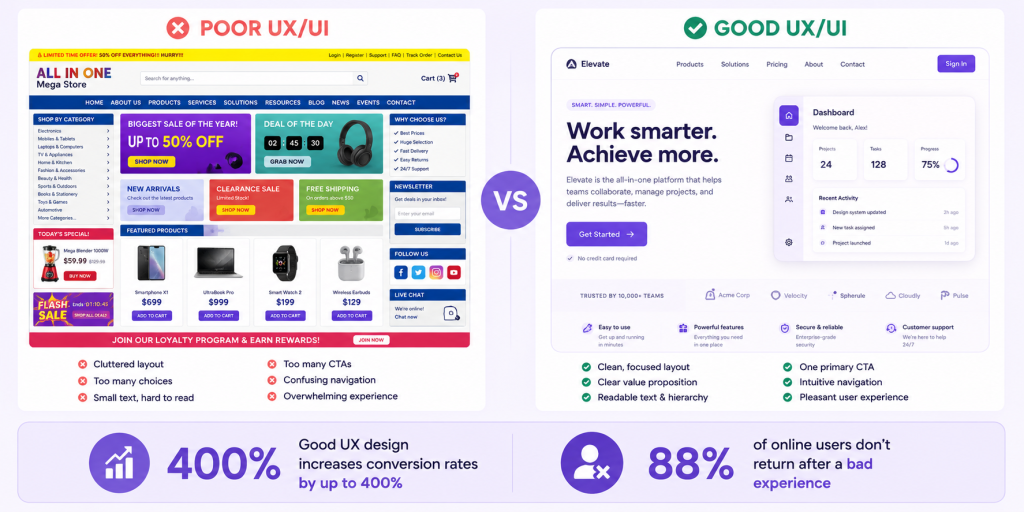
For business owners with websites — whether on WordPress, Shopify, or custom-built platforms — UX/UI design is one of the highest-ROI investments available. Here is why:
The Business Impact of UX/UI Design
| Business Metric | How UX/UI Design Affects It |
|---|---|
| Conversion Rate | Every UX improvement to a checkout or landing page directly increases sales. McKinsey research shows companies with top design performance outperform industry benchmarks by 2–3×. |
| Customer Retention | Users return to products they find easy and enjoyable. Poor UX is cited as the #1 reason users switch to a competitor. |
| Support Costs | Intuitive design reduces confusion — fewer users contact customer support. Every support ticket not raised saves money. |
| Bounce Rate | Well-designed landing pages keep visitors on site longer, reducing bounce rate and improving SEO signals. |
| Brand Perception | Professional UI design signals credibility and quality — directly influencing purchase decisions and brand trust. |
| Development Costs | Investing in UX design before development reduces expensive redesigns and bug fixes. $1 spent on UX saves $10 in development and $100 post-launch. |
Frequently Asked Questions (FAQ)
Q1: What is the difference between UX and UI design?
UX (User Experience) design focuses on how a product works — the overall experience, usability, and satisfaction. UI (User Interface) design focuses on how a product looks — the visual design, colours, typography, and interactive elements. UX is the blueprint; UI is the finished visual layer built on top of it.
Q2: Which is more important — UX or UI design?
Both are essential and work together. Poor UX with beautiful UI results in a pretty but frustrating product. Great UX with poor UI results in a functional but untrustworthy-looking product. The most successful digital products invest equally in both UX and UI design.
Q3: Do I need to know how to code to be a UX/UI designer?
No coding knowledge is required to start a career in UX/UI design. Design tools like Figma allow you to create wireframes, prototypes, and production-ready visual designs without writing a single line of code. However, a basic understanding of HTML and CSS helps designers create more developer-friendly designs and communicate more effectively with development teams.
Q4: What tools do UX/UI designers use?
Figma is the industry-standard tool used by most professional UX/UI designers in 2026 — it covers wireframing, visual design, prototyping, design systems, and developer handoff. Other commonly used tools include Miro (research), Hotjar (analytics), Maze (usability testing), Adobe XD, and Framer.
Q5: How long does it take to learn UX/UI design?
With dedicated daily practice (2–4 hours per day), most beginners can build a portfolio-worthy skill set in 6–12 months. The Google UX Design Certificate on Coursera takes approximately 6 months to complete. Landing your first junior UX/UI design role typically takes 8–18 months from starting to learn.
Q6: Is UX/UI design a good career in 2026?
Yes, very much so. UX/UI design is one of the most in-demand, well-paid, and remote-friendly careers in the tech industry. Job growth is projected at 23% through 2031. The rise of AI is actually creating more demand for human-centred design thinking — not less.
Q7: What is a design system?
A design system is a comprehensive library of reusable UI components, design tokens (colours, spacing, typography), usage guidelines, and code implementations that ensure visual and functional consistency across an entire product or product family. Major examples include Google’s Material Design, Apple’s Human Interface Guidelines, and IBM’s Carbon Design System.
Q8: How does UX/UI design affect SEO?
UX/UI design directly affects SEO through Core Web Vitals (LCP, INP, CLS are UX metrics and ranking factors), mobile-friendliness (UI design quality), bounce rate and dwell time (user engagement), site structure and navigation (UX information architecture), and accessibility (semantic HTML benefits both accessibility and search engine crawlability).
Conclusion
UX/UI design is not just about making things look pretty — it is about making digital products work better for real people. It is the discipline that determines whether a website converts visitors into customers, whether an app earns loyal users or immediate deletions, and whether a digital business succeeds or fails in an increasingly competitive online landscape.
In 2026, UX and UI design are no longer optional ‘nice-to-haves’ — they are strategic business imperatives. With Google’s Core Web Vitals directly measuring user experience as ranking factors, with 88% of users not returning after a bad digital experience, and with conversion rates increasing by up to 400% through great design, the ROI on UX/UI investment is indisputable.
Whether you are a developer wanting to understand the design process, a business owner looking to improve your website’s performance, or someone considering a career in UX/UI design — the knowledge in this guide gives you a comprehensive foundation.
At Expantrix.com, we break down complex digital topics — from web development and SEO to design and beyond — into clear, actionable guides that help you build better digital experiences.
Ready to apply UX/UI design principles to your digital project? Explore more guides on Expantrix.com!