

Every website you have ever visited — from Google and Amazon to your local dentist’s site — exists online because of one thing: web hosting.
Without web hosting, websites simply cannot exist on the internet. It is the invisible foundation that every online presence is built upon, yet it is one of the least understood concepts for beginners.
In this complete, beginner-friendly guide, you will learn exactly what web hosting is, how it works step by step, the different types of hosting available in 2026, how to choose the right one for your needs and budget, how hosting affects your SEO rankings, and much more — all explained in plain, jargon-free language.
Table of Contents
What Is Web Hosting? (Definition)
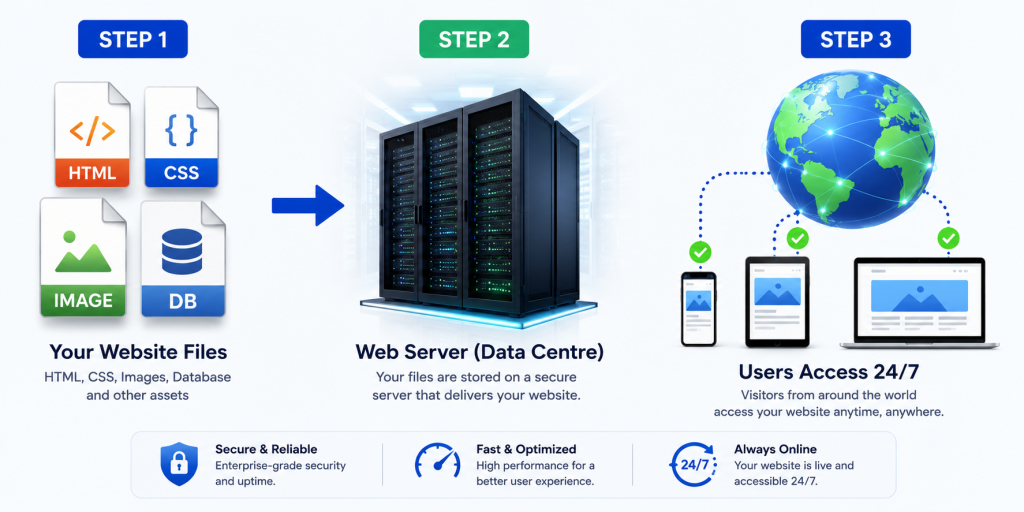
Web hosting is a service that stores your website’s files on a powerful computer called a server and makes them accessible to anyone on the internet, 24 hours a day, 7 days a week.
When you build a website, you create a collection of files — HTML pages, CSS stylesheets, JavaScript code, images, videos, and databases. These files need to live somewhere permanently, on a computer that is always switched on and connected to the internet at high speed. That computer is a web server. Web hosting is the service of renting space on that server.
Simple Definition:
Web hosting is the service that gives your website a permanent home on the internet, making it accessible to visitors anywhere in the world.
Technical Definition:
Web hosting is a service provided by hosting companies that allocates server space, computing resources (CPU, RAM), bandwidth, and storage to store website files and deliver them to visitors via HTTP/HTTPS protocols over the internet.
The Best Analogy:
Think of it this way: Your domain name (like expantrix.com) is your home address — the label that tells people where to find you. Web hosting is the actual house built at that address. Without the house, the address points to an empty lot. Without hosting, the domain points to nothing.
How Does Web Hosting Work? (Step-by-Step)
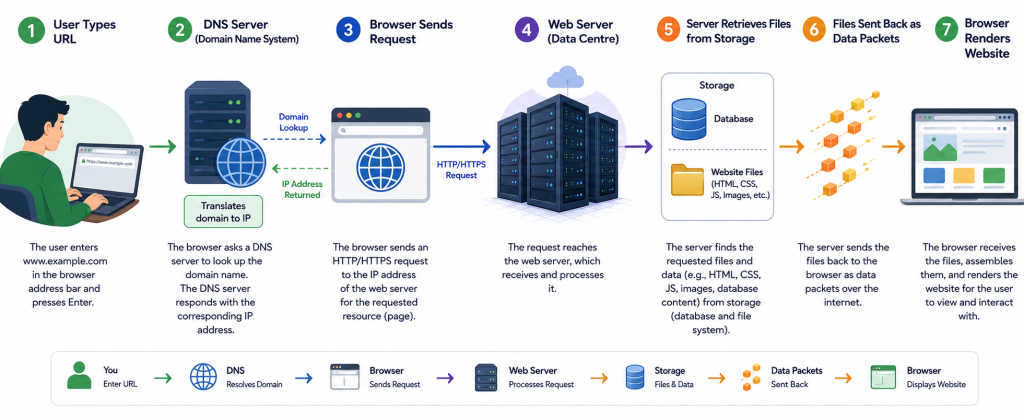
Here is exactly what happens when someone visits your website — from the moment they type your address to the page appearing on their screen:
Step 1 — You Build Your Website
You create a website using a website builder like WordPress, Wix, or Squarespace, or by writing custom HTML, CSS, and JavaScript code. Your website is a collection of files stored on your local computer.
Step 2 — You Choose a Hosting Provider & Upload Your Files
You sign up with a web hosting company. They maintain powerful servers in large data centres — climate-controlled facilities with backup power, redundant internet connections, and 24/7 monitoring. You upload your website files to their server using an FTP client, cPanel file manager, or a one-click installer.
Step 3 — Your Domain Points to the Server
You connect your domain name to your hosting server by updating your domain’s DNS (Domain Name System) records — specifically the nameservers or A records. This process is called DNS propagation and can take up to 48 hours (usually much faster in 2026).
Step 4 — A Visitor Types Your URL
When someone types expantrix.com into their browser, the browser first contacts a DNS server to translate the domain name into the server’s IP address (a numerical address like 104.21.56.88).
Step 5 — The Server Processes the Request
The browser sends an HTTP/HTTPS request to your web server at the IP address. The server locates the requested files (or queries the database for dynamic content), assembles the response, and sends it back to the browser.
Step 6 — The Website Appears on Screen
The browser receives the HTML, CSS, JavaScript, and image files, renders them, and displays the finished website. This entire process — from typing the URL to seeing the page — happens in under one second on a fast connection.
💡 PRO TIP: Web servers in professional data centres have backup power generators, multiple internet connections from different providers, and redundant hardware. This infrastructure is why professional hosting providers can guarantee 99.9%+ uptime.
Web Hosting vs. Domain Name — What’s the Difference?
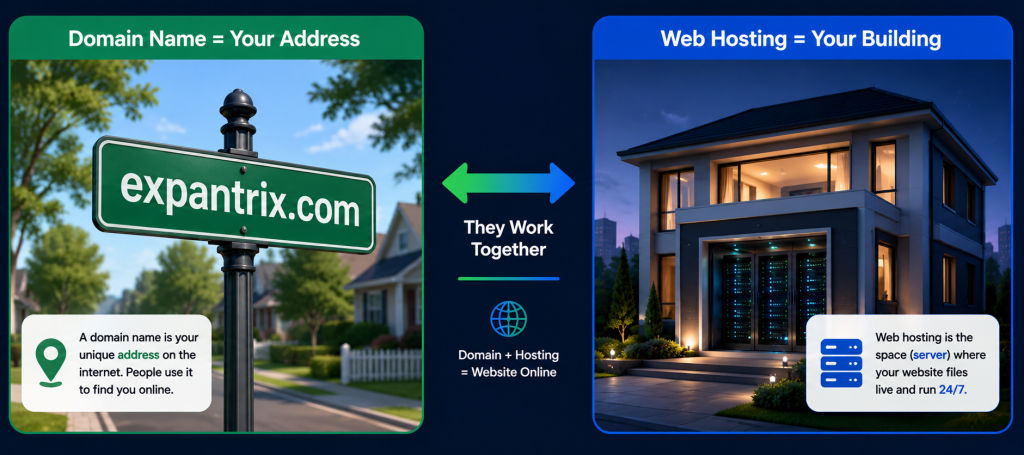
This is the single most common source of confusion for beginners. Let’s clear it up once and for all:
| Factor | Web Hosting | Domain Name |
|---|---|---|
| What it is | Space on a server to store website files | The address people type to find your site |
| Function | Makes your site visible 24/7 on the internet | Directs visitors to the right server |
| Examples | Bluehost, SiteGround, DigitalOcean | expantrix.com, google.com, amazon.com |
| What it stores | HTML, CSS, JS, images, databases | Nothing — it’s just a name |
| Typical cost | $2–$500+/month | $10–$15/year |
| Renewed | Monthly or annually | Annually |
| Analogy | The physical building | The street address of the building |
Key Takeaway: You need BOTH to have a working website. The domain name brings visitors to the right place; web hosting is where the website actually lives.
The 6 Main Types of Web Hosting
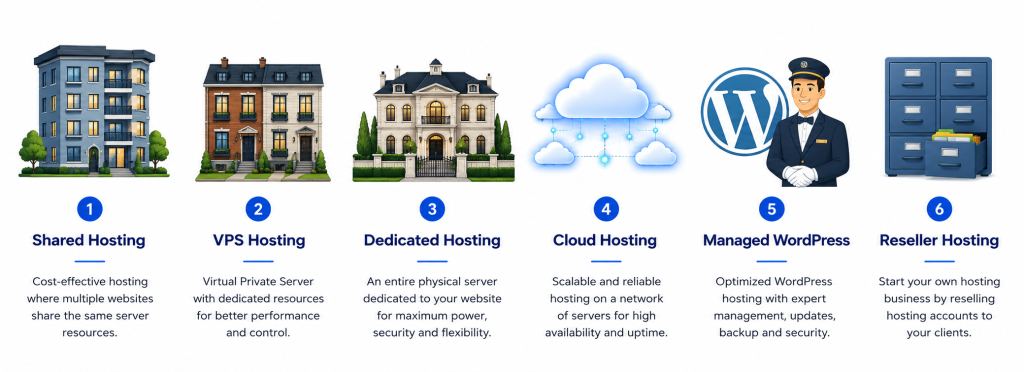
| Hosting Type | Best For | Performance | Control | Price/Month |
|---|---|---|---|---|
| Shared | Beginners, small blogs | Basic | Low | $2–$10 |
| VPS | Growing sites, developers | Good | High | $20–$80 |
| Dedicated | Large enterprises | Excellent | Full | $80–$500+ |
| Cloud | Scalable, variable traffic | Very Good | Medium | $10–$200+ |
| Managed WP | WordPress websites | Optimised | Medium | $15–$60 |
| Reseller | Agencies, freelancers | Varies | Medium | $10–$50 |
Shared Hosting — Complete Guide
What Is Shared Hosting?
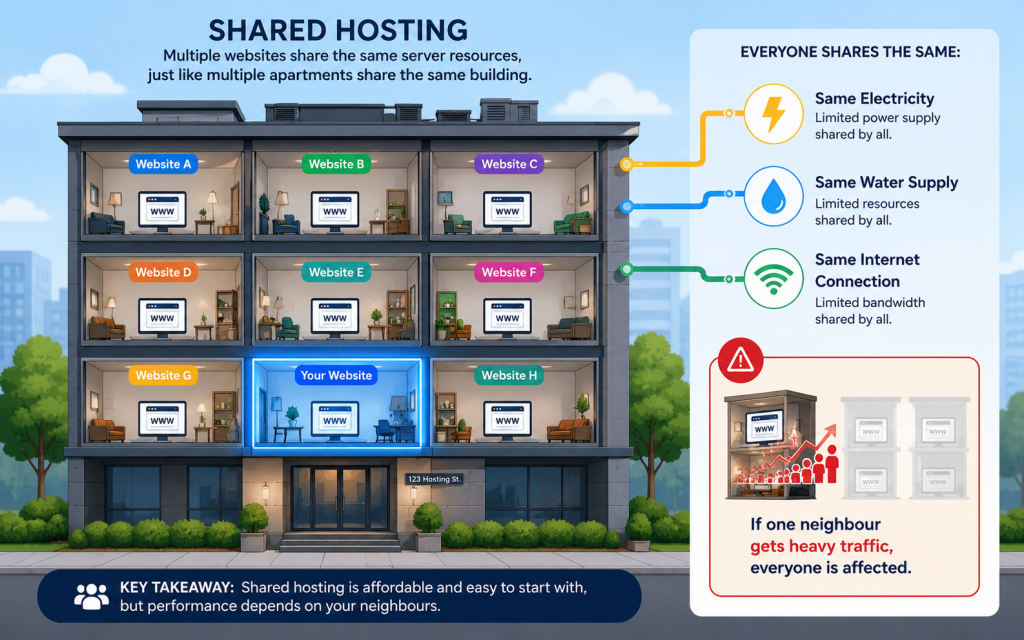
Shared hosting means your website shares a single physical server with dozens, sometimes hundreds, of other websites. All websites on that server share the same pool of resources: CPU processing power, RAM memory, storage, and bandwidth.
Analogy: An apartment building.
Each tenant has their own apartment (website), but everyone shares the building’s utilities — electricity, water, heating. If one tenant throws a massive party, the noise (resource usage) can affect everyone else.
Advantages of Shared Hosting
- Very Affordable — typically $2–$10/month, the cheapest option available
- Beginner-Friendly — hosting provider manages all server administration
- Easy Setup — one-click WordPress/CMS installers included
- Sufficient for Low-Traffic Sites — handles sites with under 10,000 visitors/month
- Includes Everything — SSL, email accounts, cPanel, and database support usually included
Disadvantages of Shared Hosting
- ‘Noisy Neighbour’ Problem — other sites’ traffic spikes can slow your site
- Limited Resources — restricted CPU, RAM, storage allocations
- Slower Performance — slower than VPS, dedicated, or cloud hosting
- Security Concerns — a compromised neighbour can affect server security
- Limited Customisation — cannot install custom server software
Who Is Shared Hosting Best For?
- Beginners building their very first website
- Personal blogs or hobby websites
- Small business brochure sites with low traffic
- Websites with fewer than 10,000 monthly visitors
⚠️ IMPORTANT: If you expect high traffic, run e-commerce, or handle sensitive user data — do NOT use shared hosting. Upgrade to VPS or cloud hosting from the start.
VPS Hosting — Complete Guide
What Is VPS Hosting?
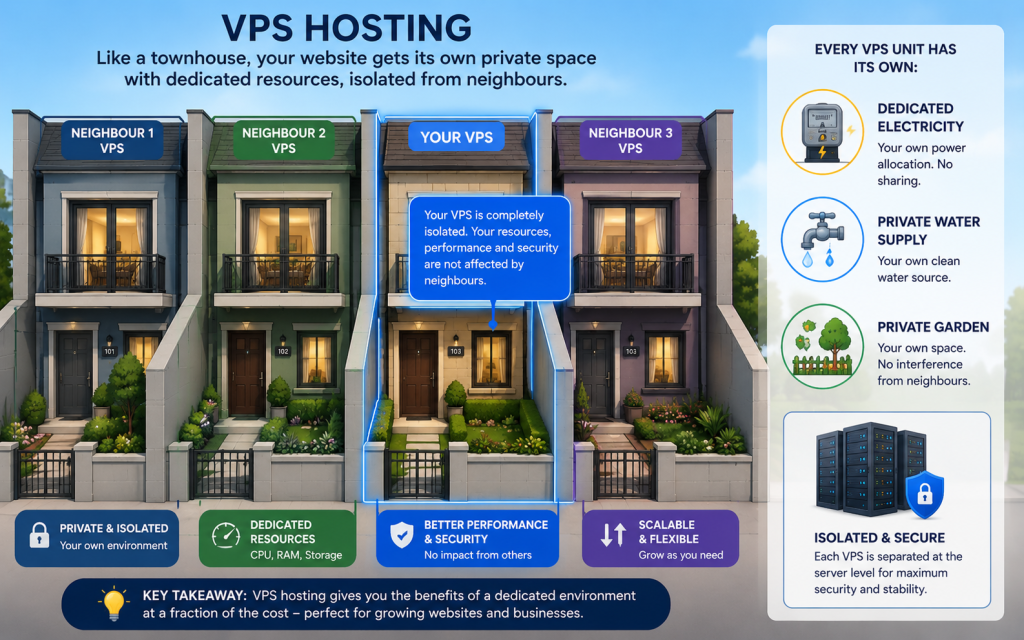
VPS stands for Virtual Private Server. VPS hosting uses virtualisation technology (like VMware or KVM) to partition a single physical server into multiple isolated virtual servers. Each virtual server gets its own dedicated allocation of CPU, RAM, and storage — guaranteed and not shared with other users on the same machine.
Analogy: A condo or townhouse.
You share the physical building with other owners, but your unit is completely private and self-contained. Your heating, electricity, and water are entirely your own. What the other condo owners do does not affect your resources.
Managed vs. Unmanaged VPS — Key Difference
| Managed VPS | Unmanaged VPS |
|---|---|
| Hosting provider handles server setup and maintenance | You handle all server administration yourself |
| Automatic security patches and updates | Manual updates required |
| Technical support for server issues | Support only for network-level issues |
| Higher price ($40–$100+/month) | Lower price ($20–$60/month) |
| Best for: Non-technical users who need VPS performance | Best for: Developers with Linux knowledge |
Who Is VPS Hosting Best For?
- Websites receiving 10,000–100,000 monthly visitors
- E-commerce stores needing better performance and security
- Developers needing custom server configurations
- Websites that have outgrown shared hosting limitations
Dedicated Server Hosting — Complete Guide
What Is Dedicated Hosting?
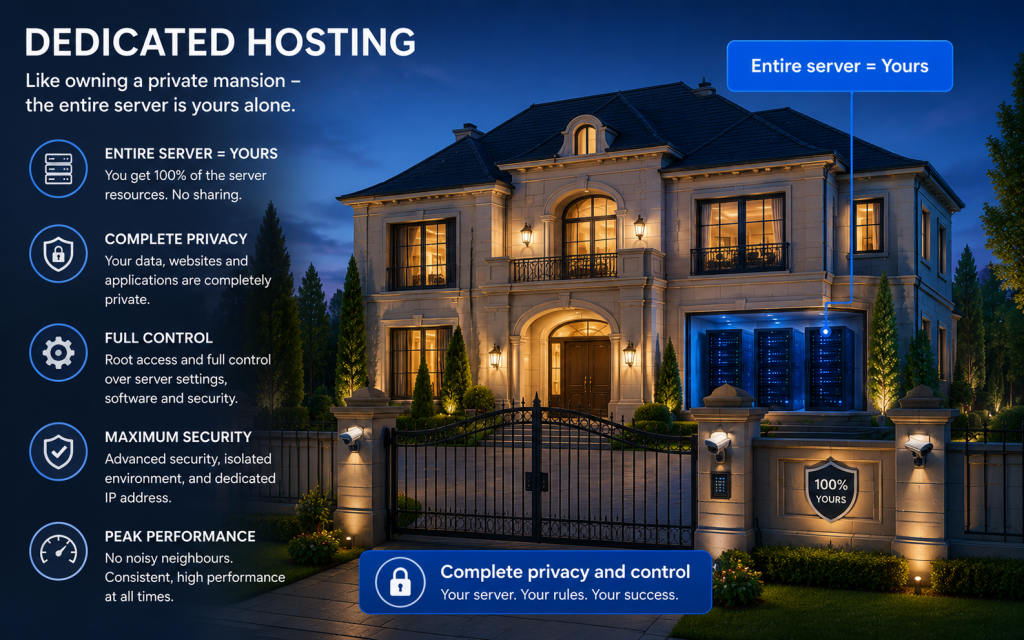
Dedicated hosting means you rent an entire physical server exclusively for your website. There is no sharing whatsoever — 100% of the server’s CPU, RAM, storage, and bandwidth belong to you alone.
Analogy: Owning your own private mansion.
Complete privacy. Complete control. Complete responsibility. You decide how every room is arranged, what you put in it, who has access, and how it is maintained.
Advantages of Dedicated Hosting
- Maximum Performance — all computing resources dedicated to your site
- Highest Security — no shared environment means no neighbour security risks
- Complete Customisation — choose your OS, configure any software, full root access
- Predictable Performance — no traffic spikes from other sites affect you
Disadvantages of Dedicated Hosting
- Very Expensive — $80–$500+ per month
- Requires Advanced Technical Skills — unless opting for managed dedicated hosting
- Overkill for Most Websites — only needed for very high-traffic or resource-intensive applications
Who Is Dedicated Hosting Best For?
- Large enterprise websites with 100,000+ monthly visitors
- High-volume e-commerce platforms
- Applications requiring custom security configurations (PCI-DSS, HIPAA compliance)
- Game servers or high-computing applications
Cloud Hosting — Complete Guide
What Is Cloud Hosting?
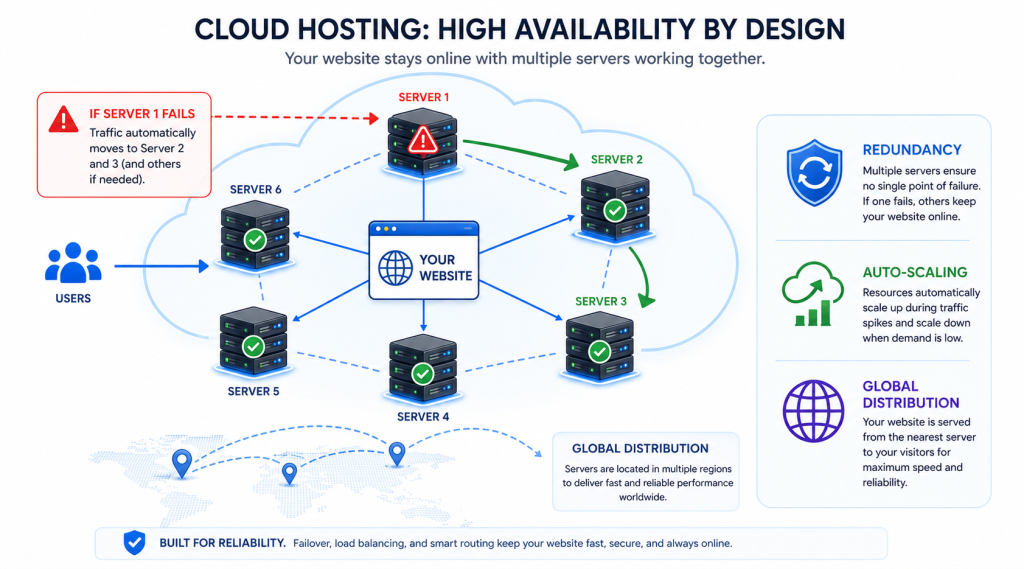
Cloud hosting distributes your website across a network of multiple interconnected virtual servers rather than a single physical machine. Your website’s files are replicated across multiple servers. If one server fails or becomes overloaded, another server in the network automatically serves your website without any downtime.
Analogy: A utility grid (like electricity).
Instead of having your own power generator (dedicated server), you tap into the national power grid. It scales up automatically on cold days when everyone uses more heating. It redirects power if one power station fails. You pay for exactly what you use.
Advantages of Cloud Hosting
- Redundancy — if one server fails, others pick up instantly (no single point of failure)
- Auto-Scaling — automatically handles traffic spikes without manual upgrades
- Pay-as-You-Go Pricing — many cloud hosts charge only for resources actually used
- Global CDN Integration — serve content from servers closest to each visitor
- Excellent Uptime — 99.99%+ availability with reputable cloud providers
Disadvantages of Cloud Hosting
- Potentially Unpredictable Costs — traffic spikes can cause unexpected bill increases
- Requires Some Technical Knowledge — configuration can be complex
- Overkill for Low-Traffic Sites — the cost vs benefit may not justify it for beginners
Who Is Cloud Hosting Best For?
- Websites with unpredictable or rapidly growing traffic
- Startups expecting fast growth
- Global websites needing to serve visitors in multiple countries quickly
- Sites requiring near-100% uptime for business continuity
Managed WordPress Hosting — Complete Guide
Managed WordPress Hosting is a specialised hosting solution built and optimised exclusively for WordPress websites. The hosting provider takes care of all WordPress-specific technical tasks — so you can focus entirely on content, design, and growing your business.
| Managed WordPress Hosting | Regular Shared/VPS Hosting |
|---|---|
| Pre-installed, pre-optimised WordPress environment | You install WordPress yourself |
| Automatic WordPress core, theme, plugin updates | You manage all updates manually |
| WordPress-specific firewall and malware scanning | Generic server-level security only |
| Server-level WordPress caching (no plugin needed) | You install and configure caching plugins |
| WordPress expert support team | General hosting support |
| Staging environments for safe testing | Usually not included |
| Higher cost ($15–$60+/month) | Lower cost ($2–$80/month) |
Top Managed WordPress Hosts in 2026
- Kinsta — Google Cloud-powered, premium performance ($35+/month)
- WP Engine — industry leader in enterprise WordPress ($25+/month)
- Cloudways — flexible managed cloud hosting ($11+/month)
- SiteGround — great balance of features and price ($20+/month)
Key Features to Look for in Web Hosting in 2026
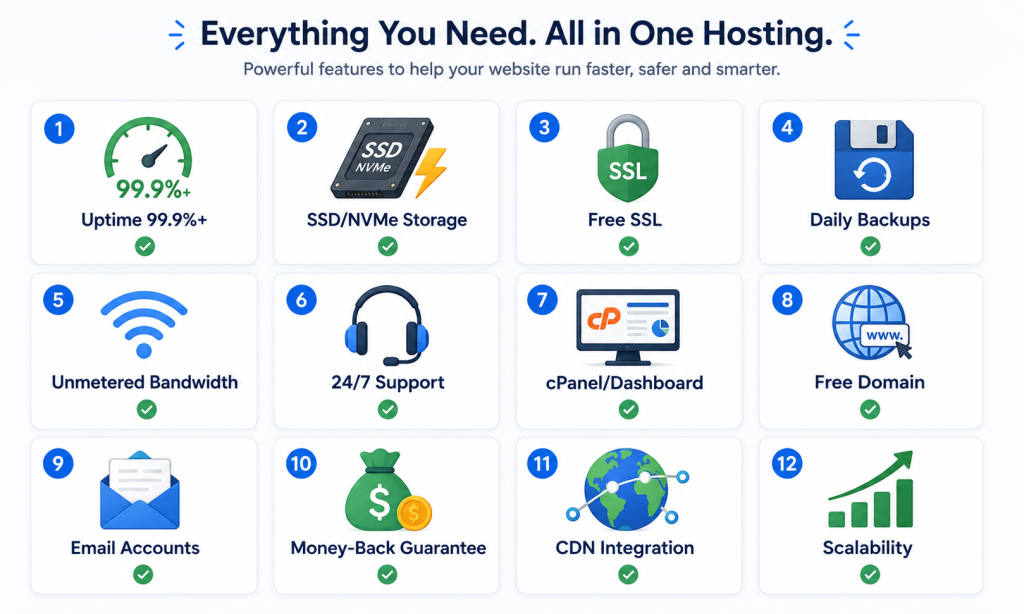
| Feature | Why It Matters | What to Look For in 2026 |
|---|---|---|
| Uptime Guarantee | Site must stay online 24/7 | 99.9% minimum; 99.99% ideal (Google penalises downtime) |
| Storage Type | Directly affects page load speed | NVMe SSD (fastest) > SSD > HDD (avoid HDD) |
| Free SSL Certificate | HTTPS is a Google ranking factor | Must be free and auto-renewed (Let’s Encrypt) |
| Automatic Backups | Recover from hacks, crashes, or mistakes | Daily automated backups with free 1-click restore |
| Bandwidth | Handles your traffic without throttling | Unmetered or 50GB+ for growing sites |
| Customer Support | Resolve problems quickly — uptime depends on it | 24/7 live chat + phone + knowledge base |
| Control Panel | Manage your hosting without technical knowledge | cPanel, Plesk, or custom easy dashboard |
| Scalability | Grow without migrating to a new host | Upgrade path from shared → VPS → Cloud |
| Server Location | Closer server = faster page loads for your audience | Choose server in or near your target country |
| Email Hosting | Professional email (you@yourdomain.com) | Includes business email accounts |
| CDN (optional) | Speeds up site globally | Cloudflare CDN integration |
| Money-Back Guarantee | Test risk-free | Minimum 30-day guarantee |
How to Choose the Right Web Hosting for Your Website
With dozens of hosting providers and multiple hosting types, how do you choose? Here is a simple decision framework:
Question 1: What Type of Website Are You Building?
- Personal blog / portfolio → Shared hosting ($2–$10/month)
- Small business website → Shared hosting or entry-level VPS
- WordPress website → Managed WordPress or optimised shared hosting
- E-commerce store → VPS, Cloud, or Managed WordPress with WooCommerce
- High-traffic media site → Cloud hosting or dedicated server
Question 2: How Much Traffic Do You Expect?
- 0–10,000 visitors/month → Shared hosting is sufficient
- 10,000–100,000 visitors/month → VPS hosting recommended
- 100,000+ visitors/month → Dedicated or Cloud hosting required
Question 3: What Are Your Technical Skills?
- Complete beginner → Shared hosting or Managed WordPress
- Some technical experience → Managed VPS or Cloud hosting
- Developer / sysadmin → Unmanaged VPS, Dedicated, or Cloud (AWS/DigitalOcean)
Question 4: What Is Your Budget?
- $2–$10/month → Shared hosting
- $10–$20/month → Managed WordPress or entry-level VPS
- $20–$80/month → VPS or mid-tier Cloud hosting
- $80+/month → Dedicated server or premium Cloud
Question 5: Are There Any Red Flags to Avoid?
- Hosts that advertise $0.99/month without clearly showing high renewal rates
- ‘Unlimited’ claims — always have fair-use policies in the fine print
- Hosts without 24/7 live chat support
- No money-back guarantee
- No mention of SSL, backups, or uptime guarantees
✅ SEO TIP: Your hosting choice has a direct impact on SEO. Fast loading speed, 99.9%+ uptime, HTTPS (SSL), and server location all affect your Google rankings. Never sacrifice hosting quality to save a few dollars.
Web Hosting and SEO — The Critical Connection
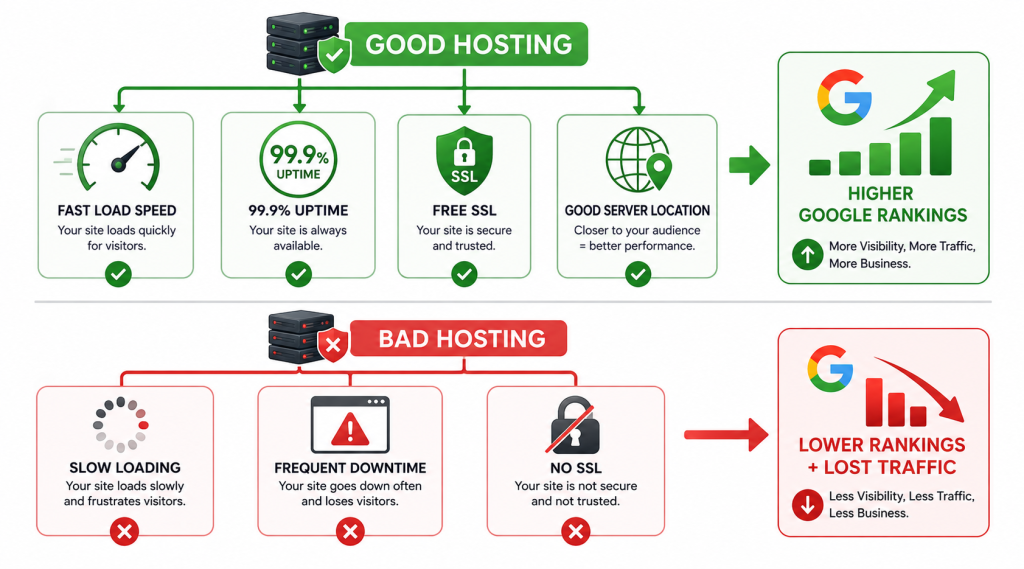
Your web hosting provider directly influences your SEO performance in multiple ways. Here is how:
1. Page Load Speed = Direct SEO Ranking Factor
Google uses page speed — specifically Core Web Vitals (LCP, INP, CLS) — as a confirmed ranking signal since 2021. Slow hosting = slow pages = lower rankings. Studies consistently show that even a 1-second delay in page load time can reduce conversions by up to 7%.
2. Uptime Directly Affects Crawlability
If your website is frequently down, Google’s crawlers (Googlebot) cannot access your pages. Consistent downtime signals to Google that your site is unreliable, which can reduce crawl frequency and harm rankings. Look for hosts guaranteeing 99.9% uptime minimum.
3. SSL Certificate (HTTPS) Is a Ranking Signal
Google confirmed HTTPS as a ranking signal in 2014. Websites without SSL certificates (HTTP sites) receive a ‘Not Secure’ warning in Chrome and are penalised in rankings. All reputable hosting providers in 2026 include free SSL via Let’s Encrypt.
4. Server Response Time (TTFB) Affects Rankings
TTFB (Time To First Byte) measures how long it takes a server to respond to a browser request. Google recommends under 600ms. Cheap, overloaded shared hosting often has high TTFB (2–5 seconds), which directly harms your LCP Core Web Vital score.
5. Server Location Affects Page Speed
Physical distance between your server and your visitor adds latency. A visitor in Bangladesh accessing a server in New York will experience higher latency than accessing a server in Singapore. Use a server located near your primary audience, or use a CDN to mitigate the distance.
How Much Does Web Hosting Cost in 2026?
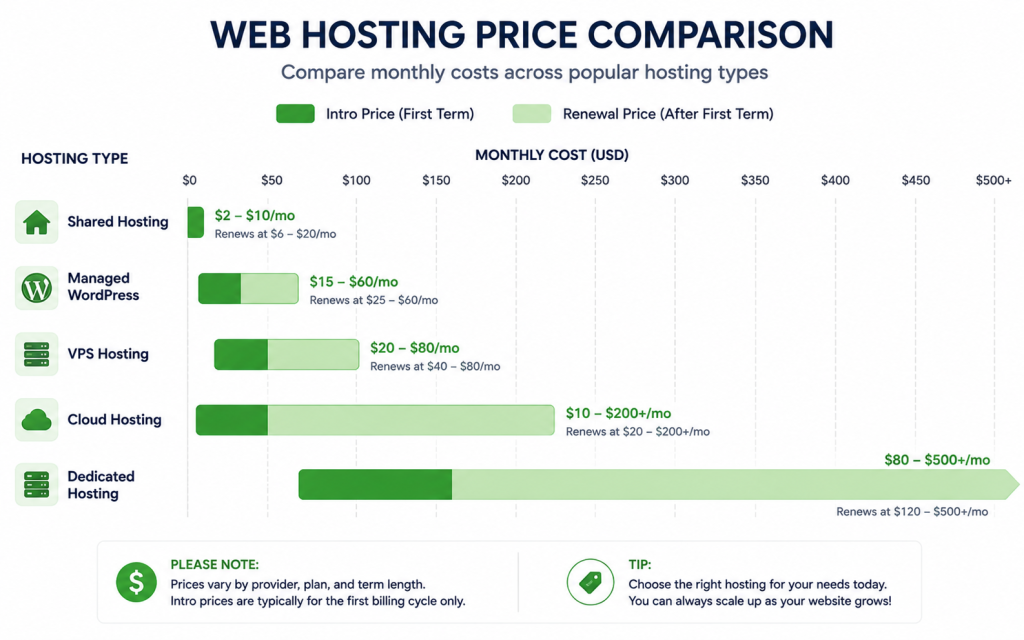
| Hosting Type | Intro Price/Month | Renewal Price/Month | Annual Total (approx) |
|---|---|---|---|
| Shared Hosting | $2–$10 | $5–$15 | $24–$180/year |
| Managed WordPress | $15–$60 | $20–$70 | $180–$840/year |
| VPS Hosting | $20–$80 | $25–$90 | $240–$1,080/year |
| Cloud Hosting | $10–$200+ | Pay-as-you-go | Variable |
| Dedicated Server | $80–$500+ | $100–$600+ | $960–$7,200+/year |
⚠️ IMPORTANT: The #1 trick hosting companies use: advertise a low introductory rate (like $2.95/month) requiring a 1–3 year upfront commitment. When you renew, the price jumps to $10–$15/month. ALWAYS check the renewal price before purchasing. Calculate the true total cost of ownership.
The Best Web Hosting Providers in 2026
Based on independently verified uptime data, speed tests, customer support quality, and value for money, here are the top web hosting providers in 2026:
| Provider | Type | Best For | Starting Price | Uptime SLA |
|---|---|---|---|---|
| Bluehost | Shared / WP | WordPress beginners | $2.95/mo | 99.98% |
| SiteGround | Shared / Cloud | Speed + support | $3.99/mo | 99.99% |
| HostGator | Shared / VPS | Budget, scalability | $2.75/mo | 99.96% |
| Cloudways | Managed Cloud | Developers, flexibility | $11/mo | 99.99% |
| Kinsta | Managed WordPress | Premium WP performance | $35/mo | 99.99% |
| DigitalOcean | Cloud / VPS | Developers, custom config | $6/mo | 99.99% |
| DreamHost | Shared / VPS | Open-source, transparency | $2.95/mo | 99.97% |
| A2 Hosting | Shared / VPS | Speed (Turbo servers) | $2.99/mo | 99.95% |
💡 PRO TIP: For a beginner starting a WordPress website: Start with SiteGround or Bluehost shared hosting. Both have 1-click WordPress installation, excellent 24/7 support, free SSL, and daily backups. When your traffic grows past 10,000/month, upgrade to VPS or Cloudways.
How to Set Up Web Hosting — Step by Step
Getting your website online with web hosting is simpler than most beginners think. Here is the complete process:
- Step 1 — Choose Your Hosting Provider: Based on your budget, traffic expectations, and technical skills, select a hosting provider from the list above.
- Step 2 — Select a Hosting Plan: Choose the appropriate tier (shared, VPS, managed WordPress). Most beginners should start with shared hosting.
- Step 3 — Register or Connect Your Domain: Either register a new domain through the hosting provider (many offer a free first-year domain) or connect an existing domain by updating your nameservers.
- Step 4 — Complete Payment and Account Setup: Choose your billing cycle (annual is usually cheaper), complete checkout, and access your hosting control panel.
- Step 5 — Install Your Website Platform: Use the one-click installer for WordPress, or upload your custom website files via the cPanel File Manager or FTP.
- Step 6 — Configure Your Domain: Ensure your domain’s DNS records point to your hosting server. Your hosting provider will give you nameserver addresses to update at your domain registrar.
- Step 7 — Install SSL Certificate: Most hosts auto-install Let’s Encrypt SSL. If not, activate it via your hosting control panel.
- Step 8 — Test Everything: Check all pages, forms, and functionality. Test on multiple devices (phone, tablet, desktop). Check page load speed with Google PageSpeed Insights.
- Step 9 — Go Live and Submit to Google: Submit your sitemap to Google Search Console to get your new site indexed.
💡 PRO TIP: Using WordPress? The complete setup — from signing up for hosting to having a working WordPress site live — takes most beginners under 30 minutes with a modern one-click installer.
Web Hosting Glossary (Key Terms Explained)
| Term | Simple Explanation |
|---|---|
| Server | A powerful computer that stores website files and serves them to visitors |
| Bandwidth | The amount of data transferred between your server and visitors per month |
| Uptime | The percentage of time your website is online and accessible |
| TTFB | Time To First Byte — how quickly the server starts responding to a request |
| SSL | Secure Sockets Layer — encrypts data between server and browser (enables HTTPS) |
| cPanel | A popular web hosting control panel for managing files, email, databases |
| FTP | File Transfer Protocol — used to upload/download files to/from a server |
| CDN | Content Delivery Network — serves site from servers closest to visitors worldwide |
| DNS | Domain Name System — translates domain names to IP addresses |
| Nameservers | DNS servers that link your domain name to your hosting server |
| IP Address | The numerical address of a server (e.g., 104.21.56.88) |
| VPS | Virtual Private Server — isolated virtual server with dedicated resources |
| Root Access | Full administrative control over a server |
Frequently Asked Questions (FAQ)
Q1: What is web hosting in simple terms?
Web hosting is the service that stores your website’s files on a server and makes them accessible to anyone on the internet. Without hosting, your website cannot be found online.
Q2: Can I host a website for free?
Yes — platforms like GitHub Pages (for static sites), WordPress.com (limited), and Google Sites offer free hosting. However, free hosting comes with major limitations: forced subdomains (yoursite.wordpress.com instead of yoursite.com), limited storage, no custom plugins, ads on your site, and poor performance. For any professional website, paid hosting starting at $2–$3/month is strongly recommended.
Q3: What is the difference between web hosting and a domain name?
A domain name (expantrix.com) is your website’s address — what people type to find you. Web hosting is the server space where your website’s actual files are stored. You need both to have a working website.
Q4: What is the best type of web hosting for beginners?
Shared hosting is the best starting point for beginners. It is affordable ($2–$10/month), requires no technical knowledge, includes one-click WordPress installers, and is managed entirely by the hosting provider. Once your site grows past 10,000 visitors/month, upgrade to VPS or managed WordPress hosting.
Q5: How does web hosting affect SEO?
Web hosting affects SEO in five key ways: (1) Server speed affects page load time — a Google ranking factor. (2) Uptime affects crawlability — if your site is down, Google cannot index it. (3) SSL/HTTPS is a confirmed Google ranking signal. (4) Server location affects page speed for your geographic audience. (5) Server response time (TTFB) directly affects Core Web Vitals scores.
Q6: Can I switch web hosting providers later?
Yes, switching hosting providers is entirely possible and very common. Most hosting providers offer free website migration services. The process involves backing up your website, transferring files and databases to the new host, and updating your domain’s nameservers. DNS propagation after switching can take up to 48 hours.
Q7: What is an uptime guarantee, and what should I look for?
Uptime is the percentage of time your website is accessible online. A 99.9% uptime guarantee sounds excellent but allows up to 8.7 hours of downtime per year. A 99.99% guarantee allows only 52 minutes per year. For business websites, look for 99.9% minimum and choose providers with compensation policies for downtime.
Q8: Do I need technical skills to use web hosting?
No technical skills are needed for shared hosting or managed WordPress hosting. Modern control panels (cPanel) and one-click installers make setup easy for complete beginners. VPS and dedicated hosting require Linux server administration knowledge if unmanaged, but managed versions are handled by the provider.
Conclusion
Web hosting is the essential foundation of every website. Without it, no website — from a simple blog to a billion-dollar e-commerce platform — could exist online. Choosing the right hosting is one of the most important technical decisions you will make for your online presence.
For beginners: start with reliable shared hosting from a reputable provider. As your website grows in traffic, revenue, and complexity, upgrade to VPS, cloud, or managed hosting for better performance, security, and control.
Remember these three golden rules of web hosting: (1) Never sacrifice speed or reliability for a cheap price. (2) Always check the renewal rate, not just the introductory offer. (3) Ensure your hosting includes free SSL, daily backups, and 24/7 support.
At Expantrix.com, we help you navigate every aspect of building a successful online presence — from web hosting and domains to SEO, web development, and digital marketing.
Ready to launch your website? Explore more guides on Expantrix.com!