
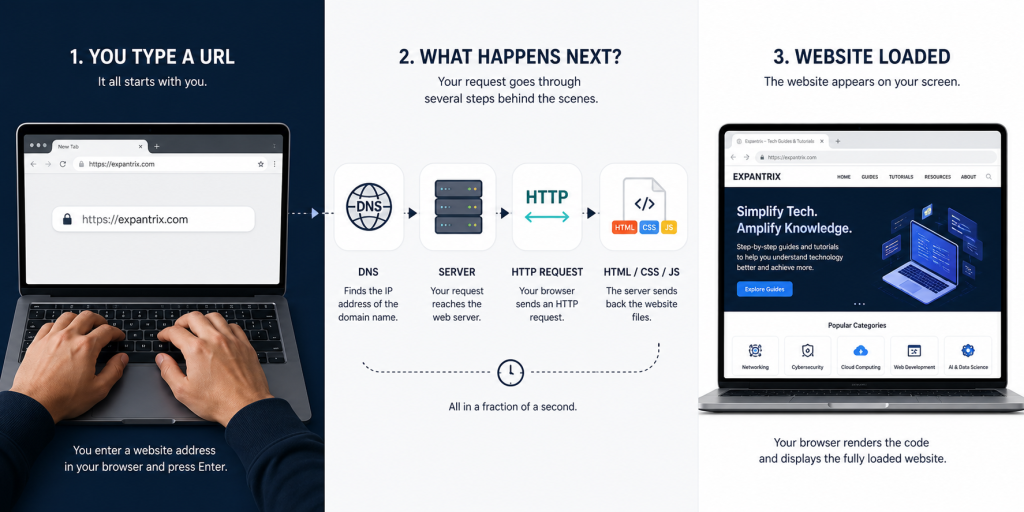
Every day, billions of people type website addresses into their browsers and instantly see beautiful, fully interactive web pages — but very few understand what actually happens behind the scenes.
How does your browser know where to find a website? How does text, images, and video travel from a faraway computer server to your screen in under a second? What makes a webpage look the way it does? What is the difference between a website and a web app?
In this complete beginner-friendly guide, you will learn exactly how websites work — from the moment you type a URL to the moment the page appears on your screen — plus everything in between: domains, hosting, DNS, servers, HTML, CSS, JavaScript, databases, and more.
Table of Contents
What Is a Website?
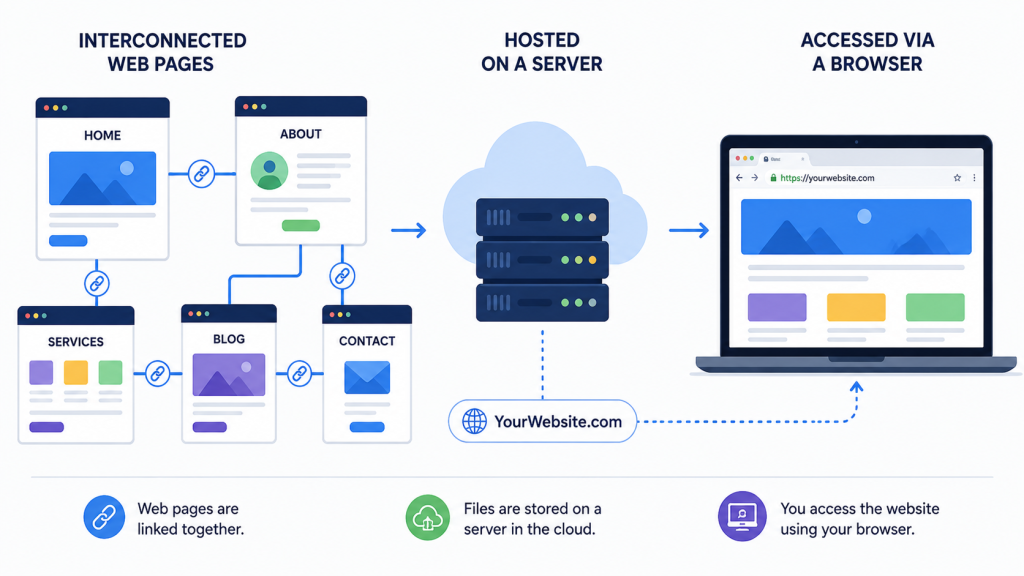
A website is a collection of related web pages, images, videos, and other digital content that is stored on a web server and is accessible via the internet through a web browser.
Think of a website like a book. Just as a book is a collection of pages bound together with a title on the cover, a website is a collection of web pages grouped under one domain name (like expantrix.com). Each page in the book is like a web page — containing text, images, and links.
Simple Definition:
A website is a set of publicly accessible web pages located under a single domain name, hosted on a web server, and accessed through the internet.
Website vs. Web App — What’s the Difference?
| Website | Web Application |
|---|---|
| Primarily displays information | Highly interactive, like software |
| Users mostly read/consume content | Users perform actions (login, buy, edit) |
| e.g. Blog, news site, portfolio | e.g. Gmail, Google Docs, Canva, banking app |
| Simpler tech stack | Complex backend + database + APIs |
| Mostly static or semi-dynamic | Fully dynamic, user-specific content |
In 2026, the line between a website and a web app is increasingly blurred. Many modern websites are actually web applications under the hood.
The Key Building Blocks of a Website
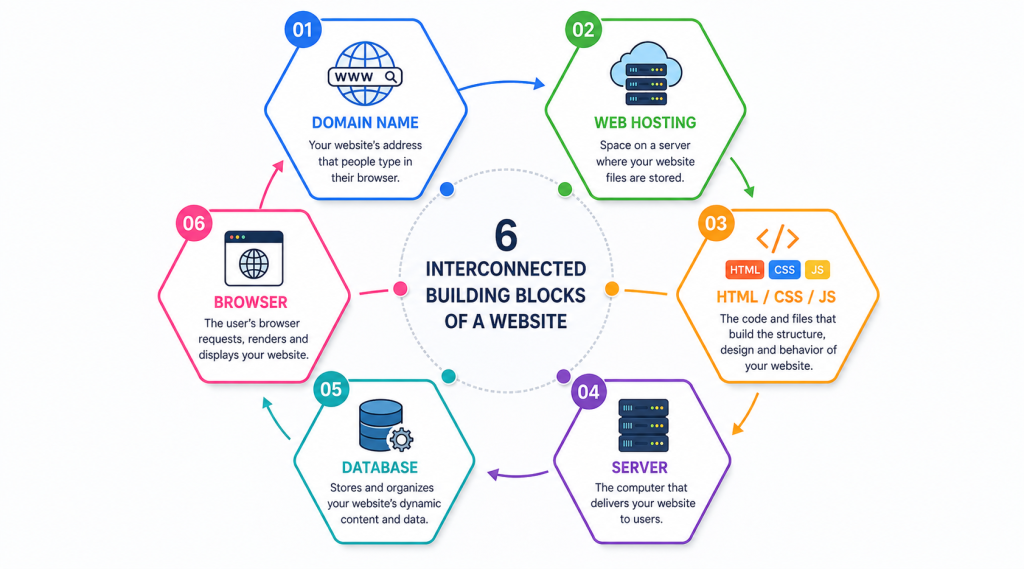
Before diving into the step-by-step process, it helps to understand the key components that work together to make any website function:
| Component | What It Is | Real-World Analogy |
|---|---|---|
| Domain Name | The website’s address (e.g., expantrix.com) | Your home’s street address |
| Web Hosting | Server space where website files are stored | The land/building where your home is built |
| DNS | Translates domain names to IP addresses | A phonebook/address book for the internet |
| Web Server | Sends website files to browsers on request | A waiter who delivers your food order |
| HTML | Defines the structure and content of a page | The frame/structure of the house |
| CSS | Controls the design, colours, and layout | The paint, wallpaper, and interior design |
| JavaScript | Adds interactivity and dynamic behaviour | The electricity and moving parts |
| Database | Stores and retrieves dynamic data | The filing cabinet storing all records |
| Browser | Renders website files into visible pages | Your eyes that read the finished page |
How a Website Gets to Your Screen — Step by Step
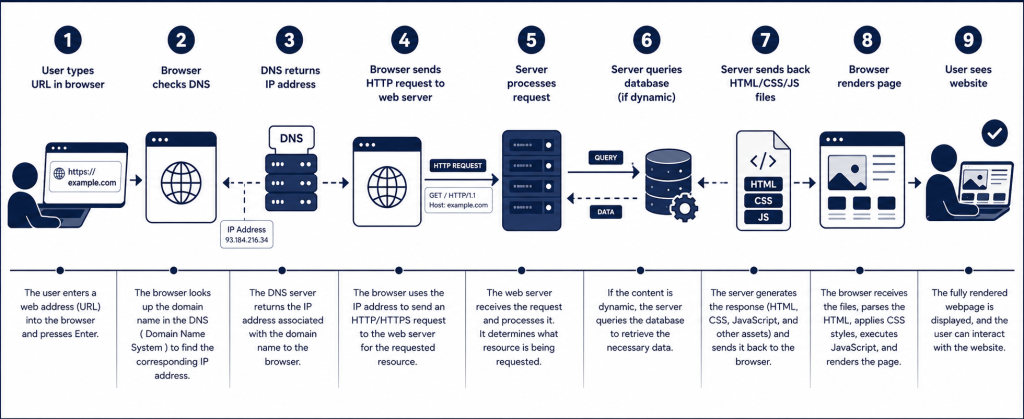
Here is exactly what happens in the fraction of a second between you pressing Enter and seeing a web page:
Step 1 — You Type a URL in Your Browser
A URL (Uniform Resource Locator) is the web address you type — for example, https://expantrix.com/how-do-websites-work/. It consists of several parts:
- https:// — the protocol (secure version of HTTP)
- expantrix.com — the domain name (the website’s address)
- /how-do-websites-work/ — the path (which specific page to load)
Step 2 — Browser Checks the DNS
Your browser first checks if it has recently visited this website (browser cache). If not, it contacts a DNS (Domain Name System) server. DNS is like the internet’s phonebook — it translates the human-readable domain name (expantrix.com) into a machine-readable IP address (e.g., 104.21.56.88).
Without DNS, you would have to memorise IP addresses for every website you visit.
Step 3 — Browser Sends an HTTP/HTTPS Request
Now that your browser knows the server’s IP address, it sends an HTTP or HTTPS request to that server. This request essentially says: ‘Please send me the files for the page at /how-do-websites-work/.’
HTTPS (the secure version) encrypts the data travelling between your browser and the server, protecting it from hackers who might be monitoring the connection. This is why the padlock icon appears in your browser’s address bar on secure sites.
Step 4 — The Web Server Receives and Processes the Request
The web server is a powerful computer (or cluster of computers) that stores the website’s files and is always connected to the internet, listening for incoming requests. When it receives your request, it processes it and prepares a response.
For a simple static webpage, the server simply retrieves the HTML file and sends it back. For a dynamic website (like a news site or e-commerce store), the server may first query a database to fetch the latest data, then assemble the page before sending it.
Step 5 — Server Sends Back the Files
The server sends back a response containing the HTML file and references to other required files (CSS stylesheets, JavaScript files, images, fonts). These files travel as small data packets through the internet’s infrastructure — cables, routers, and switches — back to your browser.
Step 6 — Your Browser Renders the Page
Your browser (Chrome, Firefox, Safari, Edge) receives all the files and begins rendering (building) the visual web page. This involves several steps:
- The browser parses the HTML to build the DOM (Document Object Model) — a structured tree representing all the elements on the page.
- It then parses the CSS to build the CSSOM (CSS Object Model) — defining how each element should look.
- The DOM and CSSOM are combined to form the Render Tree — which elements are visible and how they are styled.
- The browser calculates Layout — the exact position and size of every element on screen.
- Finally, the browser Paints — drawing the actual pixels on your screen.
- JavaScript is executed, adding interactivity, animations, and any dynamic content.
The entire process — from pressing Enter to a fully rendered page — typically takes less than one second on a fast connection. This is one of the most impressive feats of modern engineering.
What Is a Domain Name?
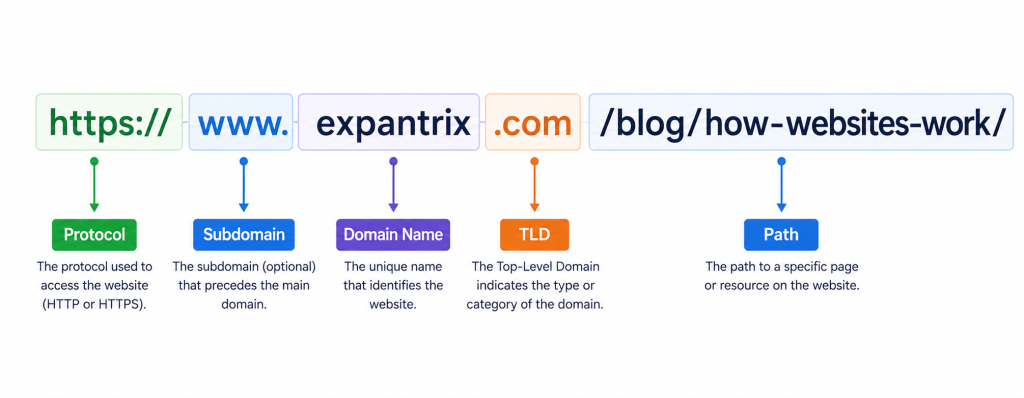
A domain name is the human-readable address of a website. Instead of memorising an IP address like 172.217.160.142, you simply type google.com. Domain names consist of two main parts:
- Second-Level Domain (SLD) — the unique name you choose (e.g., ‘expantrix’ in expantrix.com)
- Top-Level Domain (TLD) — the extension at the end (.com, .org, .net, .io, .co.uk, .com.bd)
Common TLDs and Their Meanings:
| TLD | Original Purpose | Common Use in 2026 |
|---|---|---|
| .com | Commercial | Most popular — used by businesses worldwide |
| .org | Non-profit | NGOs, open-source projects, communities |
| .net | Network | Tech companies, networks |
| .edu | Education | Universities and schools (USA) |
| .gov | Government | Government websites (USA) |
| .io | British Indian Ocean Territory | Popular with tech startups |
| .com.bd | Bangladesh | Bangladesh businesses and organisations |
| .ai | Anguilla territory | Popular with AI companies |
Domain names are registered through domain registrars (like Namecheap, GoDaddy, or Google Domains) and typically cost $10–$15 per year for a .com domain.
What Is Web Hosting?
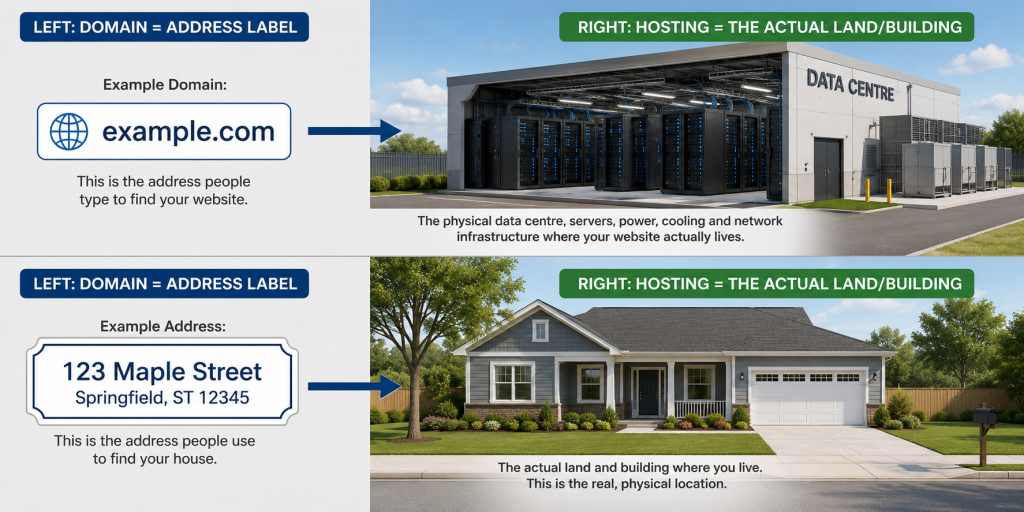
Web hosting is a service that provides the computer (server) space where your website’s files are stored and made accessible on the internet 24 hours a day, 7 days a week.
Without web hosting, your website files would only exist on your local computer — no one else could access them. Hosting companies own large data centres full of powerful servers connected to the internet via ultra-fast connections.
Types of Web Hosting:
| Hosting Type | Best For | Approx. Cost/mo | Performance |
|---|---|---|---|
| Shared Hosting | Beginners, small blogs | $2–$10 | Basic |
| VPS Hosting | Growing websites | $20–$80 | Good |
| Cloud Hosting | Scalable websites | $10–$200+ | Very Good |
| Dedicated Server | Large enterprises | $100–$500+ | Excellent |
| Managed WordPress | WordPress sites | $15–$60 | Optimised |
What Is DNS (Domain Name System)?
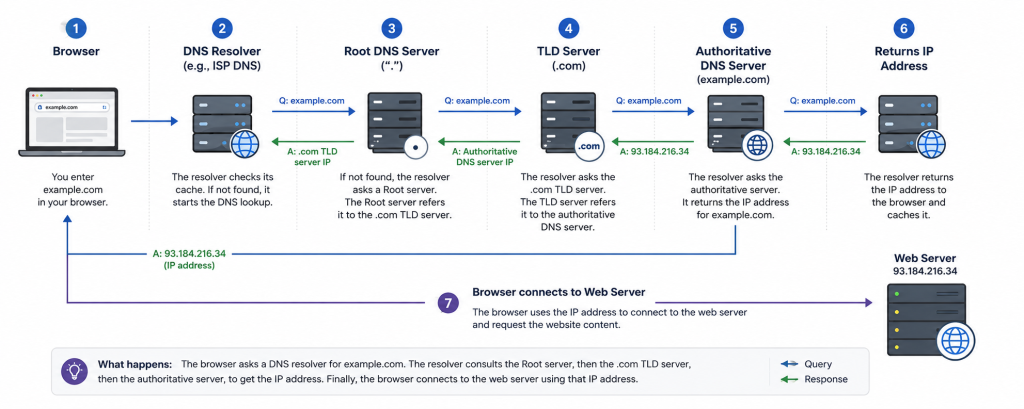
The Domain Name System (DNS) is one of the internet’s most critical yet invisible systems. It is essentially a massive distributed phonebook that maps domain names to IP addresses.
How DNS Resolution Works:
- You type expantrix.com in your browser.
- Your browser first checks its own cache. If not found, it asks your operating system.
- Your OS checks its hosts file and local DNS cache. If not found, it asks your ISP’s DNS resolver.
- The DNS resolver checks its cache. If not found, it queries the Root DNS Servers (there are 13 sets worldwide).
- The root server directs the resolver to the TLD server (e.g., the .com TLD server).
- The TLD server directs the resolver to the Authoritative Name Server for expantrix.com.
- The authoritative server returns the IP address (e.g., 104.21.56.88).
- Your browser uses this IP address to connect directly to the web server.
The entire DNS lookup process typically takes 20–120 milliseconds. After the first visit, the result is cached so future visits are even faster.
What Are HTTP and HTTPS?
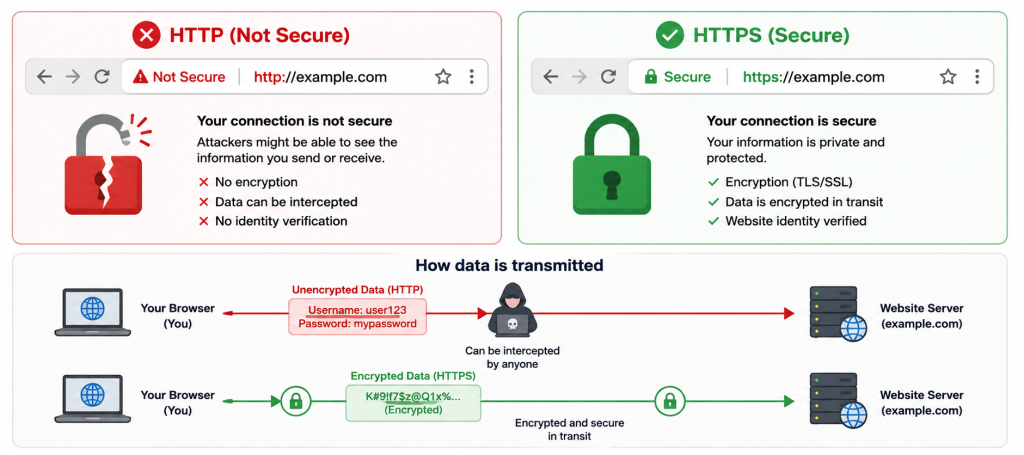
HTTP (HyperText Transfer Protocol) is the communication protocol used for transferring data between a browser and a web server. HTTPS is the secure, encrypted version.
| HTTP | HTTPS |
|---|---|
| No encryption | SSL/TLS encryption |
| Data visible to potential interceptors | Data is encrypted and protected |
| No padlock in browser address bar | Padlock icon shown in address bar |
| Lower trust — browsers show ‘Not Secure’ | Higher trust — browsers show ‘Secure’ |
| Google may penalise in rankings | Google gives ranking preference |
| Being phased out | Industry standard in 2026 |
Key Takeaway: Every website in 2026 should use HTTPS. Google uses HTTPS as a ranking signal, and browsers like Chrome actively warn users when a site is not using HTTPS.
The Three Core Web Technologies: HTML, CSS & JavaScript
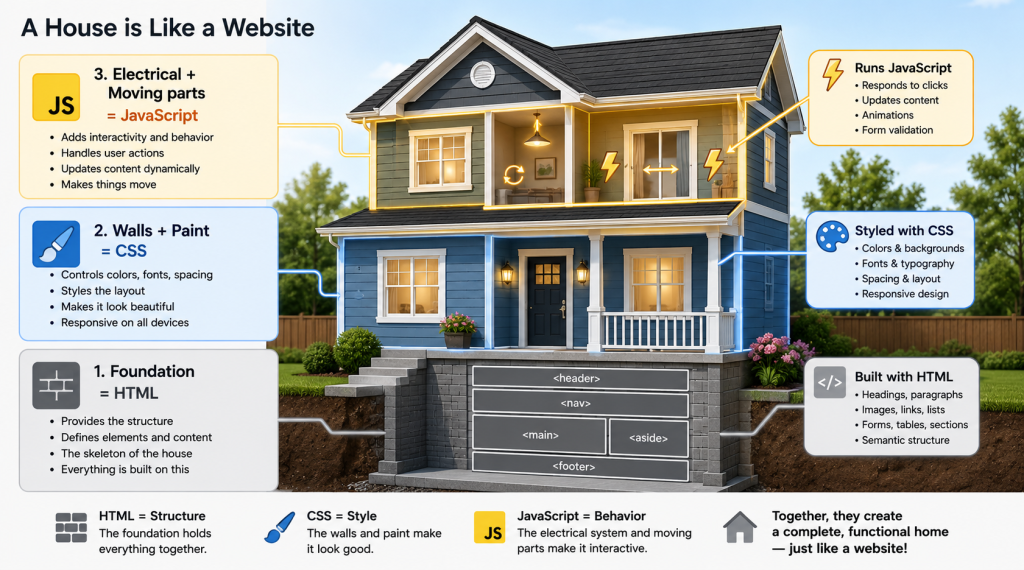
Every website you have ever visited was built using three fundamental technologies: HTML, CSS, and JavaScript. These are the three pillars of the web, and understanding them is the key to understanding how websites work.
1. HTML — HyperText Markup Language
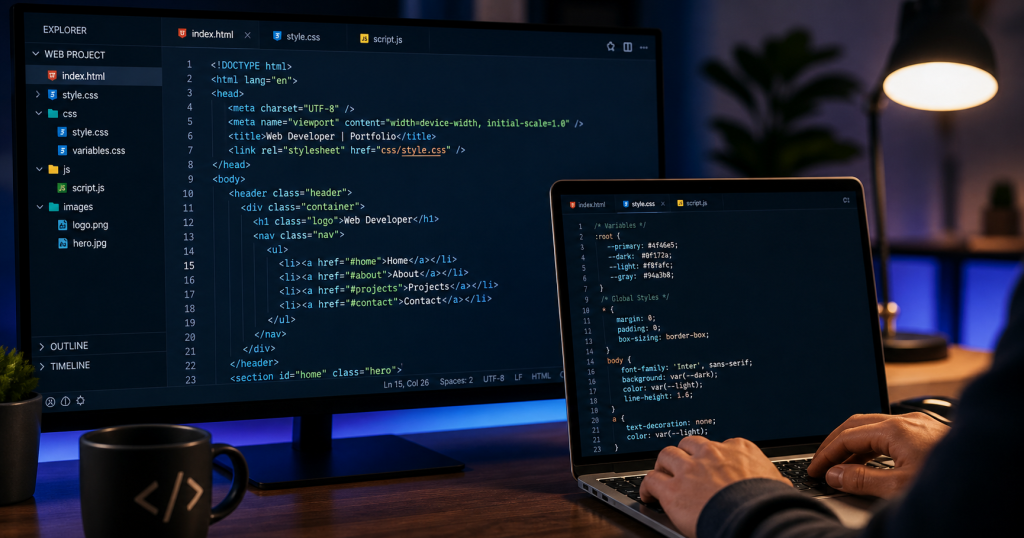
HTML is the skeleton of every web page. It defines the structure and content: headings, paragraphs, lists, links, images, forms, tables, and more. HTML tells the browser what content to display and how it is organised.
Example HTML:
<h1>Welcome to Expantrix</h1><p>Your tech knowledge hub.</p><a href=’/blog’>Read Our Blog</a>
The current version — HTML5 — introduced semantic elements like <header>, <article>, <footer>, and <nav>, which help search engines understand the structure of your page. This is important for SEO.
2. CSS — Cascading Style Sheets
CSS is the stylesheet language that controls the visual appearance of a web page. Without CSS, every webpage would look like a plain text document. CSS allows you to control:
- Colours, backgrounds, and fonts
- Layout — grid, flexbox, positioning of elements
- Responsive design — adapting to different screen sizes
- Animations and transitions
Example CSS:
h1 { color: #0D3B66; font-size: 2rem; font-family: ‘Calibri’, sans-serif;}
In 2026, CSS frameworks like Tailwind CSS and Bootstrap make it faster to build professional-looking websites. CSS also powers responsive design — ensuring websites look great on both a smartphone and a desktop monitor.
3. JavaScript — The Language of Interactivity
JavaScript is a programming language that runs inside the browser and makes web pages interactive and dynamic. Without JavaScript, clicking a button would do nothing; a form could not be validated; a menu could not slide open.
- Form validation (checking inputs before submission)
- Dynamic content updates (without reloading the page)
- Animations and visual effects
- API calls (fetching data from external sources)
- Single-Page Applications (SPAs)
In 2026, JavaScript has evolved into a full-stack technology. With frameworks like React.js, Vue.js, and Angular on the frontend, and Node.js on the server, JavaScript powers some of the world’s most complex applications.
Frontend vs. Backend — How They Work Together
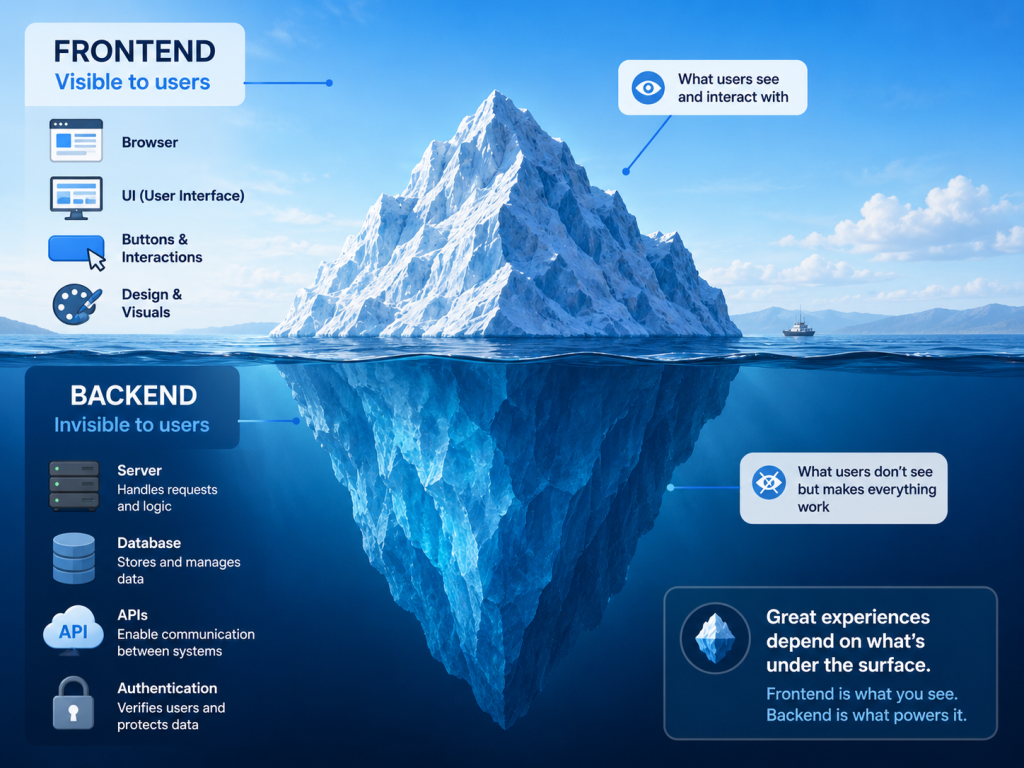
Websites have two sides: what the user sees (frontend) and what powers it behind the scenes (backend). Both must work seamlessly together for a website to function correctly.
| Frontend (Client-Side) | Backend (Server-Side) |
|---|---|
| Everything the user sees and interacts with | Server logic users never see directly |
| Runs in the user’s browser | Runs on the web server |
| HTML, CSS, JavaScript | Node.js, Python, PHP, Ruby, Java |
| React, Vue, Angular, Next.js | Express, Django, Laravel, Spring |
| Handles: layout, design, animations, UX | Handles: databases, authentication, APIs |
| Talks to backend via APIs (JSON/REST/GraphQL) | Talks to database to store/retrieve data |
What Is a Database and Why Do Websites Need One?
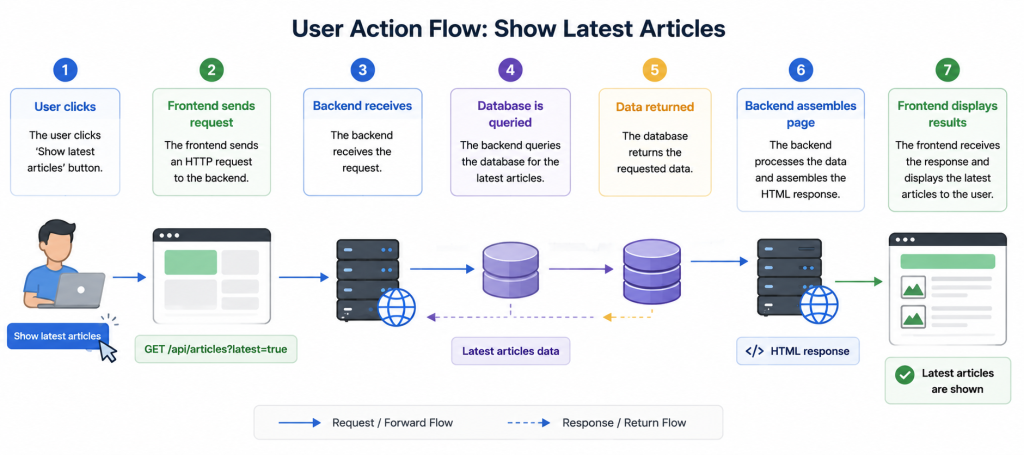
A database is an organised collection of structured data that a website can store, retrieve, and update. Almost every dynamic website you use relies on a database.
What Websites Store in Databases:
- User accounts, profiles, and login credentials
- Blog posts, articles, and page content
- Products, prices, and inventory (e-commerce)
- Orders, transactions, and payments
- Comments, reviews, and ratings
- Analytics data and session information
Common Website Databases in 2026:
| Database | Type | Best Used For |
|---|---|---|
| MySQL | Relational (SQL) | Blogs, e-commerce, traditional web apps |
| PostgreSQL | Relational (SQL) | Complex queries, data integrity |
| MongoDB | NoSQL (Document) | Flexible data structures, real-time apps |
| Firebase | NoSQL (Real-time) | Chat apps, live dashboards, mobile apps |
| Redis | In-memory cache | Session storage, caching for speed |
| SQLite | Lightweight SQL | Small apps, local development |
Static Websites vs. Dynamic Websites
Not all websites work the same way. Understanding the difference between static and dynamic websites explains why some pages load almost instantly while others require database queries.
| Static Website | Dynamic Website |
|---|---|
| Fixed files served directly to browser | Content generated on-demand by server |
| Same content for every visitor | Personalised content per visitor/session |
| No database needed | Requires database + server-side language |
| Extremely fast loading | Slightly slower (server processing needed) |
| e.g. Portfolio, brochure, documentation | e.g. E-commerce, social media, news sites |
| Built with: HTML/CSS/JS only | Built with: PHP, Python, Node.js + database |
| Hosted on: Netlify, Vercel, GitHub Pages | Hosted on: VPS, cloud servers, WordPress |
In 2026, a third category has emerged: JAMstack / SSG (Static Site Generation). Frameworks like Next.js, Gatsby, and Astro pre-render pages at build time, combining the speed of static sites with the flexibility of dynamic content.
How Browsers Render a Web Page
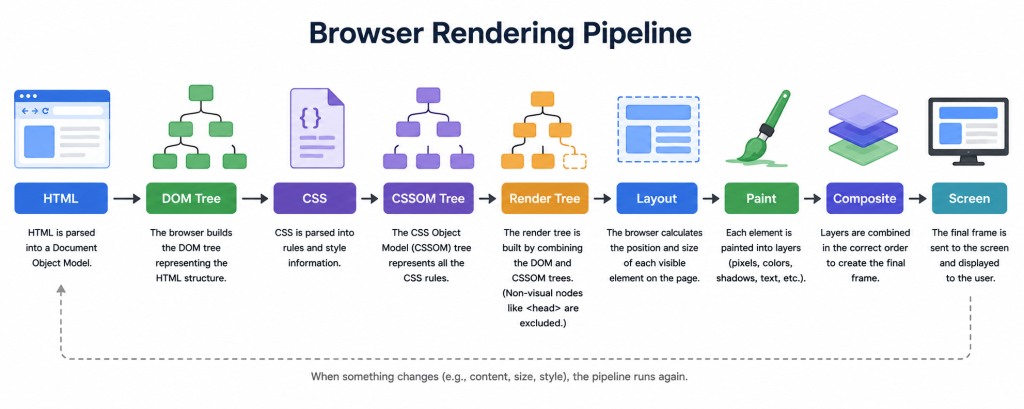
Modern web browsers are incredibly sophisticated software. Here is how a browser transforms HTML, CSS, and JavaScript files into the visual page you see:
- HTML Parsing: Browser reads the HTML file and builds the DOM (Document Object Model) — a tree structure of all HTML elements.
- CSS Parsing: Browser reads all CSS files and builds the CSSOM (CSS Object Model) — rules about how each element should look.
- Render Tree Construction: DOM and CSSOM are combined into the Render Tree — only visible elements are included.
- Layout: Browser calculates the exact size and position of every element on screen (also called ‘Reflow’).
- Painting: Browser draws pixels for every element — backgrounds, borders, text, images.
- Compositing: Multiple painted layers are combined into the final image displayed on screen.
- JavaScript Execution: JS runs to add interactivity, fetch additional data, and update the DOM dynamically.
💡 PRO TIP: Render-blocking resources (CSS and JavaScript loaded in the <head>) delay the first paint of a page. This is why web developers use techniques like async/defer for JS and critical CSS loading to improve performance and Core Web Vitals scores.
What Makes a Website Fast or Slow?
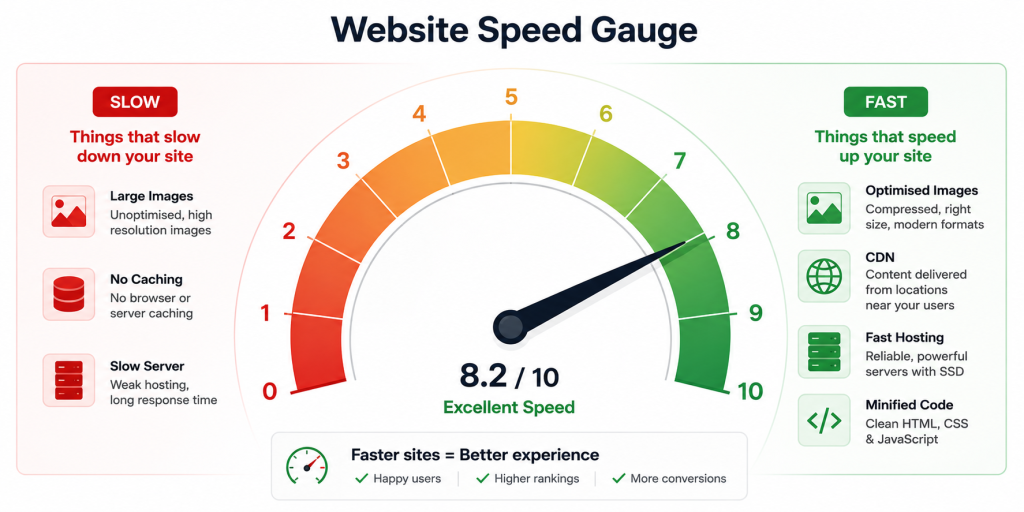
Page speed is one of Google’s most important ranking factors and directly impacts user experience. Here are the main factors that determine website speed:
Factors That Slow Down a Website
- Large, unoptimised images (the #1 cause of slow websites)
- Too many HTTP requests (loading dozens of scripts and stylesheets)
- Slow web hosting / overloaded shared servers
- No browser caching configured
- Render-blocking JavaScript and CSS
- No CDN (Content Delivery Network) used
- Excessive use of plugins (especially on WordPress)
- Unminified CSS and JavaScript files
Factors That Speed Up a Website
- Compressed and next-gen image formats (WebP, AVIF)
- CDN (Content Delivery Network) — serves files from servers closest to the user
- Browser caching — stores static files locally for repeat visitors
- Minified CSS/JS — removes whitespace and comments from code files
- Lazy loading — images only load when the user scrolls to them
- Fast, quality web hosting or cloud hosting
- HTTP/2 or HTTP/3 protocol support
- Optimised database queries on the backend
✅ SEO TIP: Google’s Core Web Vitals — LCP (Largest Contentful Paint), FID/INP (Interaction to Next Paint), and CLS (Cumulative Layout Shift) — are direct ranking factors. Scoring ‘Good’ on all three can significantly improve your Google ranking. Use Google PageSpeed Insights to check your scores.
Types of Websites in 2026
Websites serve many different purposes. Here are the most common types:
| Website Type | Purpose | Examples |
|---|---|---|
| Blog / Content | Shares articles, guides, opinions | Expantrix.com, Medium, Blogger |
| E-Commerce | Sells products or services | Amazon, Daraz, Shopify stores |
| Portfolio | Showcases creative or professional work | Personal designer/developer sites |
| Business / Corporate | Presents company info, generates leads | Company websites, landing pages |
| News / Media | Publishes news and media content | BBC, TechCrunch, Prothom Alo |
| Educational | Provides online learning | Coursera, Khan Academy, Udemy |
| Social Network | Connects users; user-generated content | Facebook, LinkedIn, Twitter/X |
| Government | Public information, services, e-gov | bdgovernment.gov.bd, NHS.uk |
| Forum / Community | Discussion, Q&A, community | Reddit, Stack Overflow, Quora |
| SaaS / Web App | Software delivered via browser | Gmail, Canva, Notion, Figma |
Frequently Asked Questions (FAQ)
✅ SEO TIP: Add each Q&A below as a RankMath FAQ Block in WordPress to auto-generate FAQ Schema markup. This targets Google’s ‘People Also Ask’ box — one of the best sources of organic traffic for informational content.
Q1: How do websites work in simple terms?
When you type a website address in your browser, it contacts a DNS server to find the website’s IP address, then sends a request to the web server at that address. The server sends back HTML, CSS, and JavaScript files, and your browser renders them into the visual page you see on screen.
Q2: What language are websites written in?
All websites are built with three core technologies: HTML (structure and content), CSS (design and layout), and JavaScript (interactivity). Beyond these, servers may use PHP, Python, Ruby, or Node.js, and databases use SQL or NoSQL languages.
Q3: Do I need to know coding to have a website?
No. In 2026, platforms like WordPress, Shopify, and Webflow allow you to create professional websites without writing a single line of code. However, understanding the basics of HTML and CSS gives you significantly more control and flexibility.
Q4: What is the difference between a website and a webpage?
A webpage is a single document (one URL). A website is a collection of related web pages grouped under one domain name. For example, expantrix.com is a website, while expantrix.com/how-do-websites-work/ is a web page within that website.
Q5: Why do some websites load faster than others?
Website speed depends on: quality of hosting, server location, image optimisation, use of a CDN, amount of code loaded, database query efficiency, and browser caching. Well-optimised websites typically load in under 2 seconds.
Q6: What is a web server?
A web server is a specialised computer (or software running on a computer) that stores website files and is always connected to the internet, ready to serve those files to browsers that request them. Examples include Apache, Nginx, Microsoft IIS, and cloud services like AWS S3.
Q7: How does a website know who I am when I log in?
When you log in, the server checks your credentials against the database. If correct, the server creates a session or issues a token (JWT) that your browser stores (usually in a cookie). On each subsequent request, your browser sends this token, allowing the server to identify you without requiring you to log in again.
Q8: What is a CMS (Content Management System)?
A CMS is software that allows you to create, manage, and publish website content without coding. WordPress (powering 43% of all websites in 2026), Joomla, Drupal, and Shopify are popular CMSs. They manage the backend complexity so you can focus on content.
Conclusion
Understanding how websites work gives you a powerful foundation — whether you want to build your own site, improve an existing one, start a career in web development, or simply become a more informed digital citizen.
Every website you visit is the result of an intricate, lightning-fast symphony: a DNS lookup converts a domain into an IP address, an HTTP request travels to a server, the server retrieves and sends back HTML/CSS/JavaScript files, and your browser renders them into the visual interactive page you see in under a second.
From the frontend trio of HTML, CSS, and JavaScript, to the backend world of servers, databases, and APIs — every component plays a critical role. And optimising each of these components for speed, security, and SEO is what separates great websites from average ones.
At Expantrix.com, we break down complex technology topics into simple, actionable guides. Whether you are a beginner or a growing developer, we have resources to help you build and grow online.
Ready to go deeper? Explore more guides on Expantrix.com!


I am sure this piece of writing has touched all the internet viewers, its really really
good article on building up new webpage.