Every time you visit a website — whether it is Google.com, BBC.co.uk, or expantrix.com — you are using a domain name. But have you ever stopped to wonder: what exactly IS a domain name? How does typing a few words into a browser connect you to a website located on a server potentially thousands of miles away?
A domain name is one of the most fundamental building blocks of the internet, yet it is surprisingly misunderstood by most beginners. Understanding domain names is essential whether you are starting a website, building a business online, or simply wanting to understand how the digital world works.
In this complete beginner’s guide, you will learn exactly what a domain name is, how it works, the different types of domain names, how to choose the right one, how much it costs, how it relates to web hosting and SEO, and step-by-step how to register your first domain name in 2026.
Table of Contents
What Is a Domain Name? (Definition)
A domain name is the unique, human-readable address used to identify and access a website on the internet. It is what you type into a browser’s address bar to navigate to a specific website — for example, expantrix.com, google.com, or bbc.co.uk.
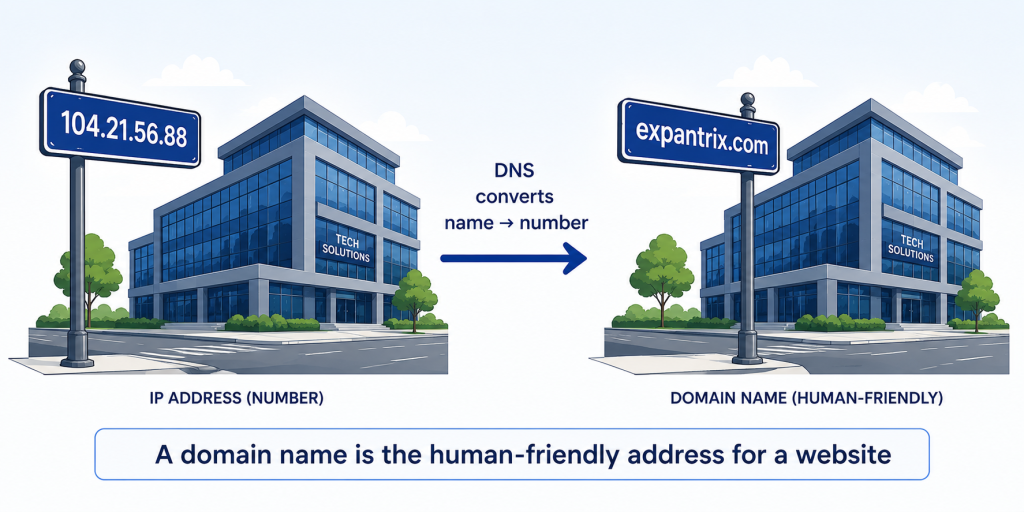
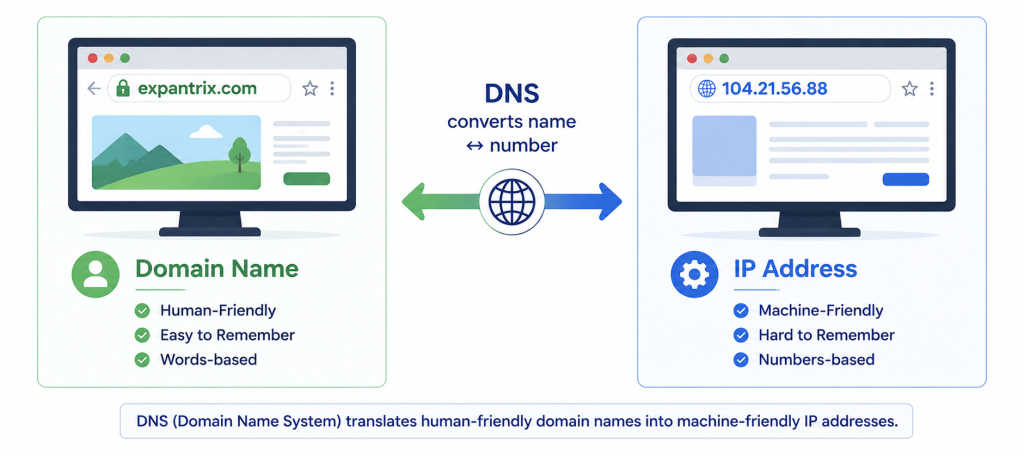
Domain names were invented to solve a very human problem: computers communicate using numbers (called IP addresses, like 172.217.160.142), but humans find it much easier to remember words. Domain names act as memorable, meaningful labels that point to the numerical addresses of web servers.
Simple Definition:
A domain name is the website address that humans type into a browser — a memorable, word-based name that points to a web server’s numerical IP address.
Technical Definition:
A domain name is a human-readable label registered in the Domain Name System (DNS) that maps to one or more IP addresses, enabling users to access internet resources without memorising numerical IP addresses.
The Best Analogy:
Think of the internet as a massive city of buildings (websites). Each building has a unique street number (IP address like 104.21.56.88) that is essential for navigation but impossible to remember for every building. Domain names are like the names on those buildings — ‘Google HQ’, ‘BBC Tower’, ‘Expantrix Centre’ — memorable labels that help you find the right destination without memorising the numbers.
How Does a Domain Name Work? (Step-by-Step)
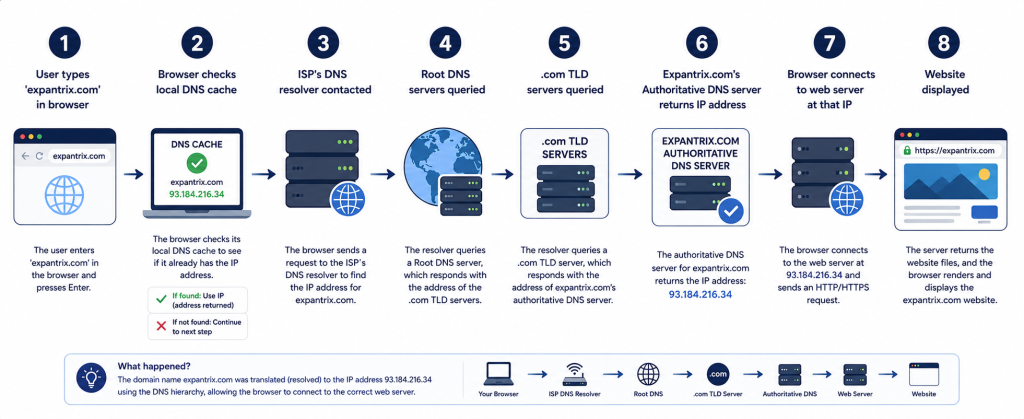
Understanding how a domain name works requires understanding the DNS (Domain Name System) — the internet’s phonebook. Here is the step-by-step process that happens in milliseconds every time you type a domain name:
Step 1 — You Type a Domain Name
You open a browser and type expantrix.com in the address bar and press Enter.
Step 2 — Browser Checks Its Cache
Your browser first checks if it has recently visited this domain. If it has the IP address stored in its cache (temporary memory), it connects directly. If not, it proceeds to the next step.
Step 3 — ISP’s DNS Resolver Is Contacted
Your browser contacts your ISP’s (Internet Service Provider’s) DNS resolver — a server that specialises in finding IP addresses for domain names. The resolver also checks its own cache first.
Step 4 — Root DNS Servers Are Queried
If the resolver doesn’t have the answer cached, it contacts one of the 13 sets of Root DNS Servers around the world. Root servers don’t know the IP address of expantrix.com, but they know where to direct the resolver next — to the appropriate TLD (Top-Level Domain) name server.
Step 5 — TLD Name Server Is Queried
The resolver contacts the TLD name server for .com (managed by Verisign). The .com TLD server says: ‘I don’t have the exact IP, but the authoritative name server for expantrix.com is this one…’
Step 6 — Authoritative Name Server Returns the IP Address
The resolver contacts expantrix.com’s authoritative name server (set by the domain registrar or web hosting provider). This server holds the DNS records for the domain and returns the actual IP address (e.g., 104.21.56.88).
Step 7 — Browser Connects to the Web Server
Now that the browser has the IP address, it sends an HTTP/HTTPS request to that IP address — the web server where expantrix.com is hosted. The server sends back the website files.
Step 8 — Website Is Displayed
The browser renders the HTML, CSS, JavaScript, and media files into the visual website you see on screen. The entire DNS lookup process typically takes 20–120 milliseconds — a fraction of a second.
💡 PRO TIP: DNS results are cached at multiple levels (browser, OS, ISP) to speed up future visits. This is why the first visit to a website is occasionally slightly slower than return visits — the DNS lookup only needs to happen once until the cache expires.
Domain Name vs. IP Address — What’s the Difference?
| Domain Name | IP Address |
|---|---|
| Human-readable text address | Machine-readable numerical address |
| Example: expantrix.com | Example: 104.21.56.88 |
| Easy to remember and type | Difficult to memorise for each website |
| Registered with a domain registrar | Assigned by web hosting providers |
| Can be changed to point to different IPs | Fixed for a specific server (unless changed) |
| Costs $10–$15/year to own | No separate cost — included in hosting |
| Resolved by DNS into IP addresses | Used by computers to locate servers directly |
In simple terms: IP addresses are how computers find each other. Domain names are how humans navigate the internet without memorising numbers.
The Anatomy of a Domain Name — All Parts Explained
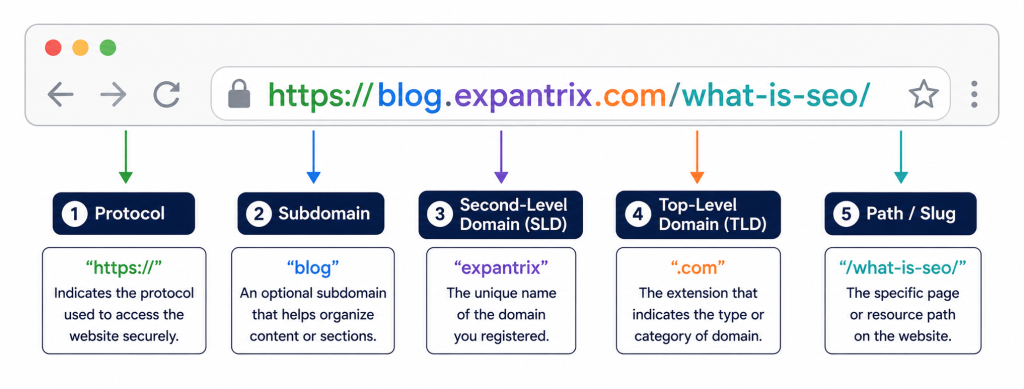
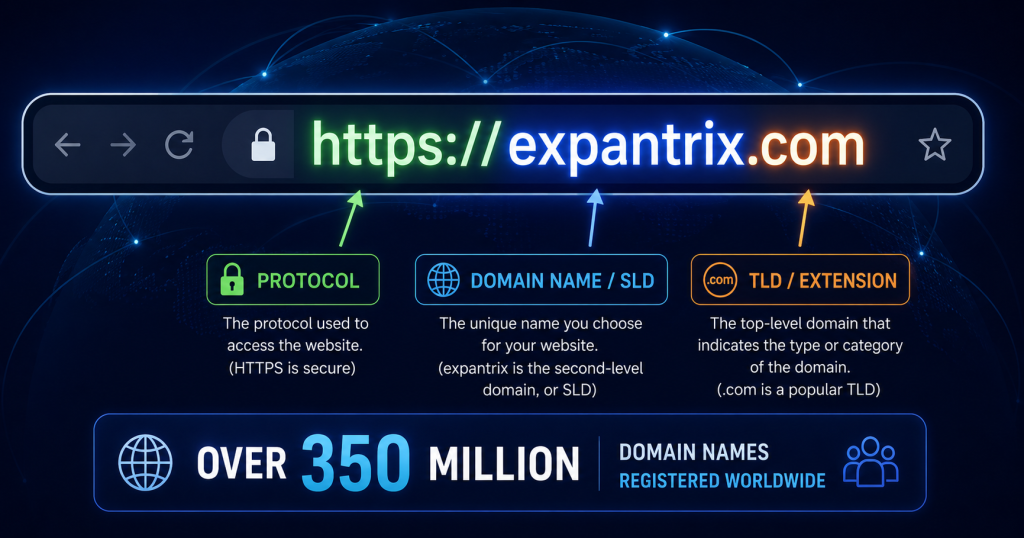
A domain name has several distinct components. Understanding each part helps you make better decisions when choosing and registering your own domain:
1. Protocol — https:// or http://
The protocol is not actually part of the domain name — it comes before it. HTTPS (HyperText Transfer Protocol Secure) is the secure, encrypted version and is the standard for all modern websites. HTTP is the older, insecure version that browsers now flag as ‘Not Secure’.
2. Subdomain — e.g., www or blog
A subdomain is a prefix before the main domain name. ‘www’ (World Wide Web) was historically used as a subdomain for websites, though many modern sites have moved away from requiring it. Common subdomains: blog.expantrix.com, shop.expantrix.com, help.expantrix.com, mail.expantrix.com.
3. Second-Level Domain (SLD) — e.g., expantrix
The SLD is the main, unique part of the domain name — the name you choose when registering. It should be your brand name, business name, or a keyword-rich name relevant to your content. This is the most important part of your domain to get right.
4. Top-Level Domain (TLD) — e.g., .com
The TLD is the extension at the end of the domain. It is the part after the final dot. TLDs are managed by ICANN (Internet Corporation for Assigned Names and Numbers) and are divided into categories:
- Generic TLDs (gTLDs): .com, .net, .org, .info, .biz
- Country-Code TLDs (ccTLDs): .uk (UK), .bd (Bangladesh), .au (Australia), .de (Germany)
- Sponsored TLDs (sTLDs): .edu (education), .gov (US government), .mil (military)
- New Generic TLDs (New gTLDs): .tech, .digital, .blog, .app, .io, .ai, .store
5. Path / Slug — e.g., /what-is-seo/
The path comes after the domain name and identifies a specific page or resource within the website. For example, expantrix.com/what-is-seo/ navigates to the ‘What is SEO?’ article specifically. This is part of the URL but not the domain name itself.
Types of Domain Names — TLDs, ccTLDs, gTLDs Explained
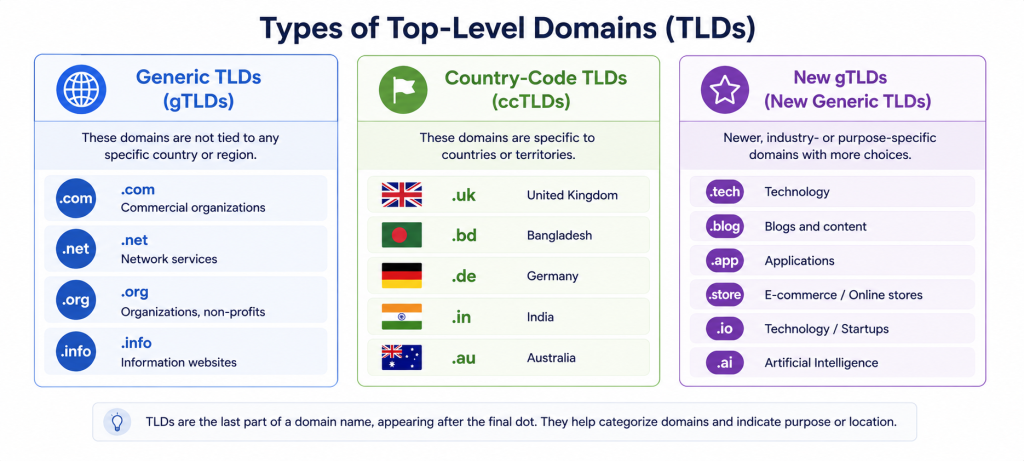
1. Generic Top-Level Domains (gTLDs)
| TLD | Original Meaning | Common Use in 2026 |
|---|---|---|
| .com | Commercial | Most popular — businesses, websites of all types globally |
| .net | Network | Tech companies, internet services, networks |
| .org | Organisation | Non-profits, open-source projects, communities |
| .info | Information | Informational websites, blogs, resources |
| .biz | Business | Small businesses, commercial use |
| .edu | Education | Accredited US universities and colleges only |
| .gov | Government | US federal, state, and local government only |
2. Country-Code Top-Level Domains (ccTLDs)
Each country has its own two-letter TLD, managed by national authorities. Examples:
| ccTLD | Country | Notes |
|---|---|---|
| .uk | United Kingdom | One of the most recognised national domains |
| .bd | Bangladesh | Used by Bangladeshi businesses and organisations |
| .com.bd | Bangladesh (commercial) | Most popular choice for BD businesses |
| .in | India | Popular for Indian businesses and services |
| .de | Germany | Second-largest ccTLD by registrations |
| .au | Australia | Requires Australian presence/ABN to register |
| .jp | Japan | Used by Japanese businesses and individuals |
| .cn | China | Requires Chinese business registration |
3. New Generic TLDs (New gTLDs) — 2026 Landscape
ICANN opened up hundreds of new TLDs in recent years. Here are the most popular new gTLDs in 2026:
| New gTLD | Best For | Example Use |
|---|---|---|
| .io | Tech startups, SaaS | startup.io, app.io |
| .ai | AI companies and products | chatbot.ai, assistant.ai |
| .tech | Technology companies | mycompany.tech |
| .app | Mobile and web applications | myapp.app |
| .store | E-commerce, online shops | myshop.store |
| .blog | Bloggers and content sites | myblog.blog |
| .digital | Digital agencies, services | agency.digital |
| .dev | Developers and tech projects | project.dev |
Which TLD Should You Choose?
.com remains the gold standard in 2026 — it is the most trusted, most recognised, and most typed extension globally. If the .com version of your desired name is available, choose it. If not, consider .net, .org, or a relevant new gTLD.
Domain Name vs. Web Hosting — What’s the Difference?
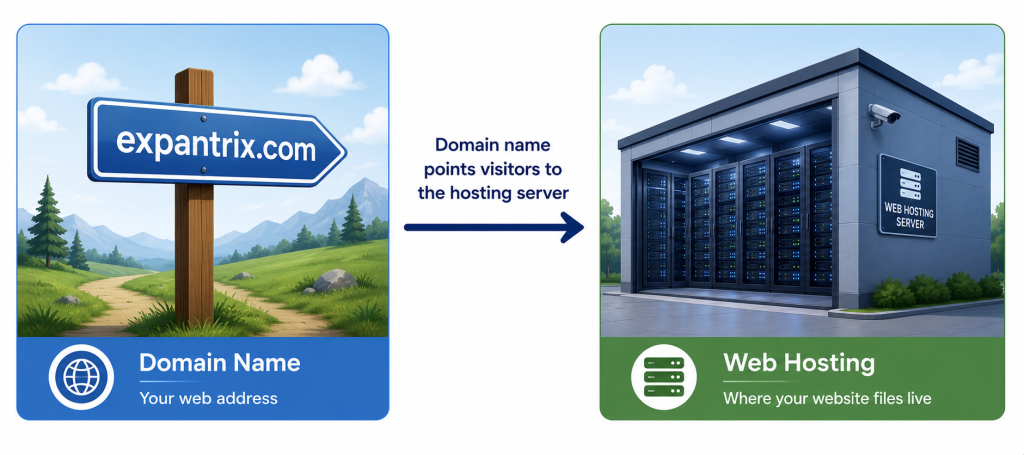
This is one of the most common points of confusion for beginners. Domain names and web hosting are two completely separate services — but both are essential for a working website.
| Factor | Domain Name | Web Hosting |
|---|---|---|
| What it is | Your website’s address | Space on a server storing website files |
| Function | Points visitors to the right server | Stores and serves your website’s files |
| Examples | expantrix.com, google.com | Bluehost, SiteGround, Cloudways |
| What it stores | Nothing — it’s just a pointer/address | HTML, CSS, JS, images, database |
| Typical cost | $10–$15/year | $2–$500+/month depending on type |
| Renewed | Annually | Monthly or annually |
| Managed by | Domain registrar (Namecheap, GoDaddy) | Web hosting company |
| Analogy | Your home’s street address | The physical house at that address |
Key Rule: You need both to have a working website. The domain name is the address; hosting is the actual location.
You can purchase a domain name and hosting separately from different companies, or together from the same provider. Many hosting companies offer a free domain name for the first year when you sign up for hosting.
Domain Name vs. URL vs. Website — All Three Explained
| Term | What It Is | Example |
| Domain Name | The address/identifier for a website | expantrix.com |
| URL | The complete web address including protocol, domain, and path | https://expantrix.com/what-is-seo/ |
| Website | The actual collection of pages and content | All pages and content at expantrix.com |
| Web Page | A single page within a website | expantrix.com/what-is-wordpress/ |
| Web Hosting | The server where website files are stored | SiteGround, Bluehost (the hosting provider) |
| IP Address | The numerical address of the server | 104.21.56.88 |
The relationship: A domain name is part of a URL. A URL points to a page within a website. A website is hosted on a server identified by an IP address that the domain name resolves to.
How to Choose the Right Domain Name
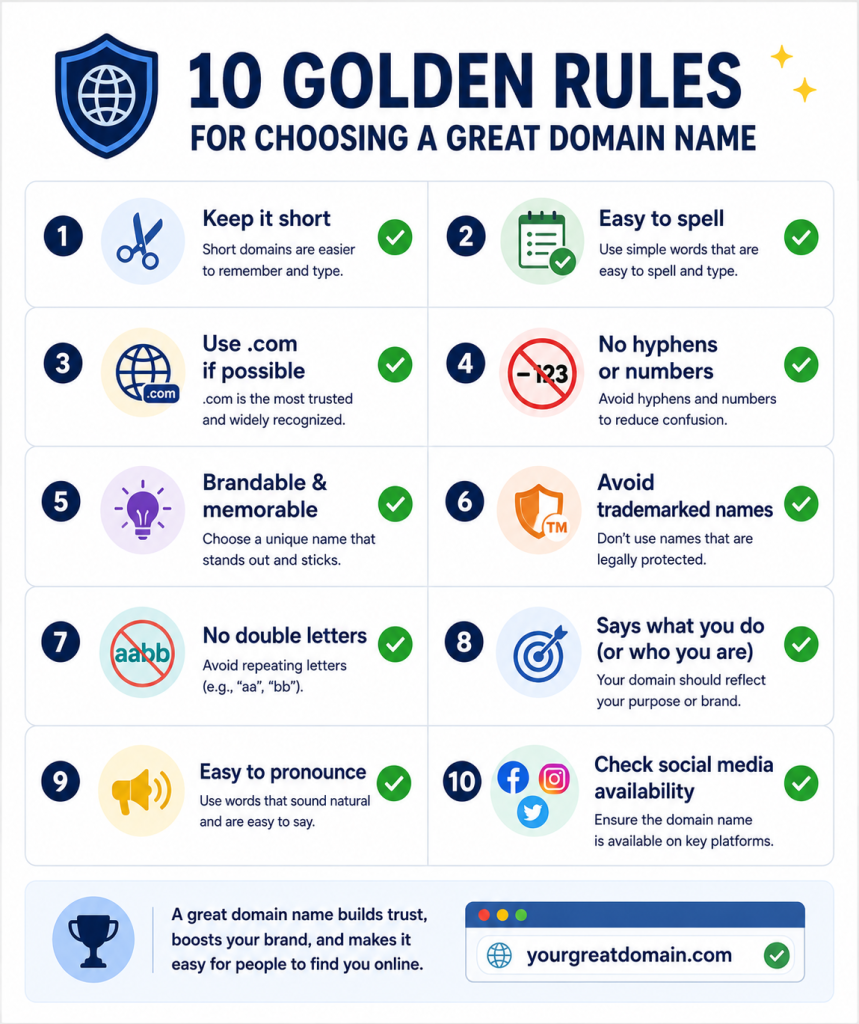
Your domain name is a long-term investment — it is part of your brand identity and appears on every piece of marketing, every email, and every search result listing. Choosing the right one matters enormously. Here are the rules:
The 10 Golden Rules for Choosing a Domain Name
- Keep It Short: Aim for 6–14 characters. Shorter domains are easier to type, remember, and share. Avoid anything over 20 characters.
- Make It Easy to Spell: If you have to spell it out every time you mention it verbally, it is too complicated. Avoid unusual spellings, homophones, and unusual word combinations.
- Choose .com If Available: .com is the most trusted and expected TLD globally. When people hear a brand name, they instinctively type .com. If the .com is taken, consider .net, .org, or a niche-specific gTLD.
- Avoid Hyphens: Hyphens are difficult to communicate verbally (‘expantrix-blog dot com’), are easy to forget, and are associated with spam sites. Never use them in a new domain registration.
- Avoid Numbers: Numbers are ambiguous — people don’t know whether to type the numeral (5) or the word (five). Avoid them entirely.
- Make It Brandable: The best domain names are unique, distinctive, and evoke something about the brand. Think Google, Netflix, Shopify — none of these are dictionary words, but they’re all highly memorable.
- Check for Trademark Issues: Before registering, search trademark databases to ensure the name is not trademarked. Using a trademarked name can result in legal action and forced domain surrender.
- Avoid Double Letters: Domains like ‘coolllooks.com’ or ‘bookkeeper.com’ cause typing errors. Avoid consecutive repeated letters where possible.
- Check Social Media Availability: Your domain name should ideally match your social media handles (Facebook, Instagram, X/Twitter, LinkedIn, YouTube). Use a tool like Namechk to check all platforms at once.
- Think Long-Term: Don’t choose a domain name that is too niche, too tied to a specific year, or one you will want to change later. Your domain name should be able to grow with your business.
✅ SEO TIP: From an SEO perspective: keyword-rich domain names (e.g., bestcoffeeshopbangladesh.com) were historically beneficial but are less important in 2026. Branded domains (expantrix.com) perform just as well with good content. Do NOT stuff keywords into your domain at the expense of brand quality.
Domain Name Generator Tools
- Lean Domain Search (leandomainsearch.com) — quickly find available domain names
- Nameboy (nameboy.com) — keyword-based domain name generator
- Namemesh (namemesh.com) — creative domain name suggestions
- Namecheap Domain Search — search availability instantly
- Instant Domain Search — real-time availability as you type
How to Register a Domain Name — Step by Step
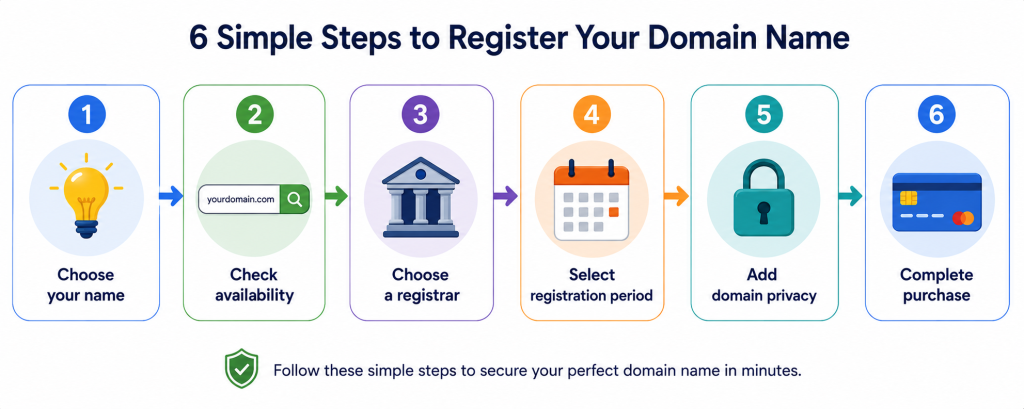
Registering a domain name is quick, easy, and affordable. Here is the complete process:
- Step 1 — Choose Your Domain Name: Apply the 10 rules above to identify several options (in case your first choice is taken).
- Step 2 — Check Availability: Use a domain registrar’s search tool to check if your desired domain is available. If it is taken, you will be shown alternatives or similar available options.
- Step 3 — Choose a Domain Registrar: A domain registrar is an accredited company authorised to sell domain names. Compare pricing, features, and reputation before choosing. Top registrars in 2026: Namecheap, Google Domains, GoDaddy, Cloudflare Registrar, Porkbun.
- Step 4 — Select Registration Period: Domains are typically registered for 1–10 years. Some registrars offer discounts for multi-year registrations. Note: You do not ‘own’ a domain permanently — you licence it for the registration period and must renew.
- Step 5 — Enable Domain Privacy (WHOIS Protection): When you register a domain, your name, address, email, and phone number become part of the public WHOIS database. Domain privacy (usually free at Namecheap/Google Domains, paid at GoDaddy) replaces your personal details with the registrar’s information, protecting you from spam and identity risks. ALWAYS enable this.
- Step 6 — Complete the Purchase: Review your cart, apply any coupon codes (check RetailMeNot or Google ‘Namecheap promo code’), and complete the purchase. You will receive a confirmation email and can now manage your domain.
⚠️ IMPORTANT: Critical: Enable auto-renewal for your domain. If you forget to renew, your domain expires, anyone can register it, and you could lose your website address permanently. Many businesses have lost valuable domains due to failed renewal. Always use a card that will remain valid through the renewal date.
How Much Does a Domain Name Cost in 2026?
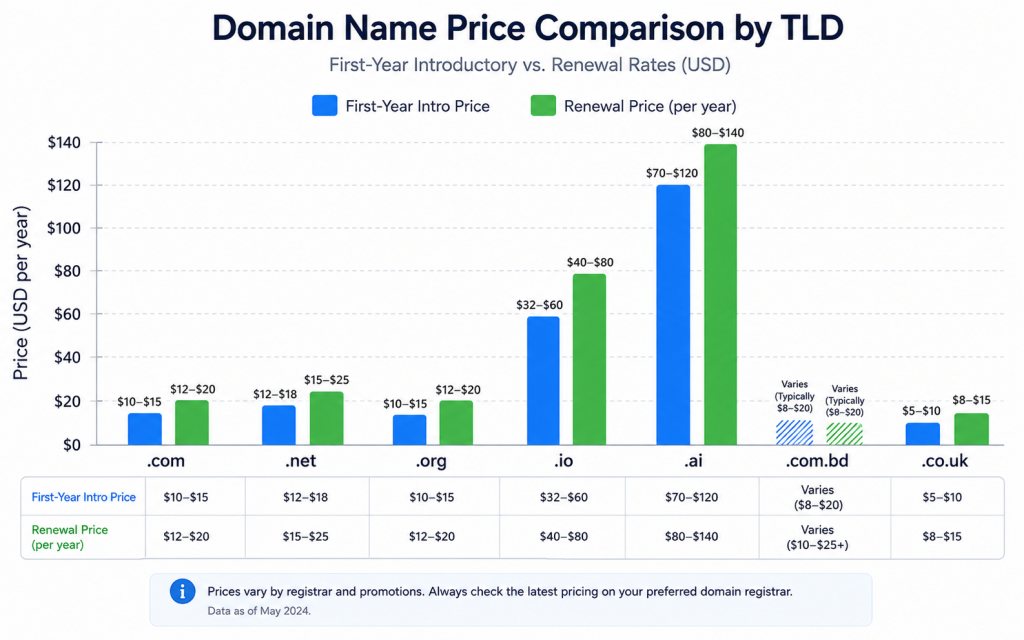
| Domain Extension | First-Year Price | Renewal Price | Notes |
|---|---|---|---|
| .com | $8–$12 | $10–$15/yr | Most popular — highest long-term value |
| .net | $10–$14 | $12–$18/yr | Second choice if .com unavailable |
| .org | $8–$12 | $10–$15/yr | Best for non-profits, communities |
| .io | $32–$40 | $35–$60/yr | Popular with tech startups |
| .ai | $60–$80 | $70–$120/yr | Premium — AI companies |
| .co.uk | $5–$8 | $5–$10/yr | UK-based websites |
| .com.bd | $15–$25 | $15–$30/yr | Bangladesh businesses |
| .store | $5–$10 | $10–$40/yr | E-commerce sites |
| .tech | $10–$15 | $35–$50/yr | Watch for high renewal prices |
| Premium | $500–$50K+ | Same annually | Valuable previously registered domains |
⚠️ IMPORTANT: Watch Out for Hidden Costs: Many registrars advertise very low first-year prices ($0.99 or $1.99) but charge full price at renewal ($15–$20). WHOIS privacy may cost extra at some registrars (Namecheap and Cloudflare offer it free). Always calculate the total cost of ownership — first year PLUS renewal year — before choosing.
The Most Affordable Registrars in 2026
- Namecheap — consistently the most affordable, free WHOIS privacy, excellent interface
- Cloudflare Registrar — charges at-cost (no markup), free WHOIS privacy, best for renewals
- Porkbun — very competitive pricing, free privacy, modern interface
- Google Domains / Squarespace Domains — transparent pricing, free privacy, Google integration
Domain Names and SEO — How They’re Connected
Your domain name choice can have both direct and indirect effects on your SEO performance. Here is what you need to know:
1. Domain Age and Authority
Older domains generally have more trust and authority in Google’s eyes — as long as they have a clean backlink history. A brand-new domain starts with zero authority and takes 6–12 months to build meaningful rankings. This is why buying established aged domains (carefully) can be advantageous.
2. Exact-Match Domains (EMD) — Are They Still Worth It?
An Exact-Match Domain (EMD) contains the target keyword exactly — for example, besthotelsbangladesh.com for a keyword ‘best hotels Bangladesh’. EMDs used to be a significant SEO advantage, but Google’s 2012 EMD algorithm update reduced their automatic benefit. In 2026, content quality, backlinks, and E-E-A-T matter far more than the domain name itself for rankings.
3. Branded Domains vs. Keyword Domains
Branded domains (expantrix.com, shopify.com, canva.com) perform equally well or better than keyword-stuffed domains in 2026. Google rewards brands, not just keywords. Choose a memorable branded domain and invest in quality content and backlinks instead.
4. HTTPS (SSL) Is a Ranking Factor
Having HTTPS (rather than HTTP) on your domain is a confirmed Google ranking signal. All reputable hosting providers include free SSL certificates via Let’s Encrypt. Ensure your domain always redirects to the HTTPS version.
5. Domain Name in Page Titles and Anchor Text
Your brand/domain name appearing in anchor text from other websites (brand mentions) is an important off-page SEO signal. A memorable, clear domain name encourages more natural brand citations.
6. ccTLDs and Local SEO
Country-specific TLDs (like .com.bd for Bangladesh or .co.uk for UK) can help with local SEO — they signal to Google that the website is relevant to a specific geographic audience. Use a ccTLD if you serve a specific country; use .com for a global audience.
✅ SEO TIP: For expantrix.com: The .com domain is the perfect choice for a global tech/digital content website. Focus your SEO efforts on creating high-quality pillar content (like this article), building topical authority, earning backlinks, and maintaining excellent technical SEO via RankMath and Google Site Kit — not on changing your domain name.
Domain Name Glossary — Key Terms Explained
| Term | Definition |
|---|---|
| Domain Registrar | An ICANN-accredited company authorised to sell and manage domain name registrations |
| WHOIS | A public database that stores registration information for all domain names (name, email, address of registrant) |
| Domain Privacy | A service that replaces your personal WHOIS data with the registrar’s details to protect your privacy |
| DNS | Domain Name System — the internet’s directory that translates domain names into IP addresses |
| DNS Records | Settings stored in DNS that control where a domain points (A record, CNAME, MX record, etc.) |
| A Record | A DNS record that maps a domain name to an IPv4 address |
| CNAME Record | Canonical Name record — maps a subdomain to another domain or hostname |
| MX Record | Mail Exchange record — directs email for a domain to the correct mail server |
| Nameservers | The DNS servers that store the DNS records for a domain |
| Domain Expiry | The date on which a domain registration expires; must be renewed to retain ownership |
| Domain Transfer | Moving a domain registration from one registrar to another |
| Domain Parking | Registering a domain without attaching a website — often shows a placeholder page |
| Premium Domain | A previously registered, high-value domain sold at a premium price |
| Expired Domain | A domain whose registration has lapsed and is available for re-registration |
| Subdomain | A prefix to the main domain (e.g., blog.expantrix.com) |
Frequently Asked Questions (FAQ)
Q1: What is a domain name in simple words?
A domain name is the website address that people type into their browser to visit a website — like expantrix.com or google.com. It is a memorable, human-friendly label that points to a web server’s numerical IP address.
Q2: What is the difference between a domain name and a website?
A domain name is just the address (expantrix.com). A website is the actual content — all the pages, articles, images, and files — that lives on a web server. You need both a domain name AND web hosting to have a working website.
Q3: What is the difference between a domain name and web hosting?
A domain name is your website’s address (what people type to find you). Web hosting is the server space where your website’s actual files are stored. The domain name points visitors to the hosting server. Both are required for a website.
Q4: How much does a domain name cost?
A standard .com domain name costs $10–$15 per year at most registrars. Namecheap and Cloudflare Registrar offer some of the most competitive pricing. First-year promotional deals can be as low as $0.99–$5, but always check the renewal price before buying.
Q5: Can I have a website without a domain name?
Technically yes — you could access a website directly via its IP address (e.g., 104.21.56.88) or use a free subdomain from a platform like WordPress.com (yourname.wordpress.com). However, for any professional or business website, a custom domain name is essential for brand credibility, SEO, and user trust.
Q6: What happens when a domain name expires?
When a domain expires, it enters a grace period (usually 30 days) during which the previous owner can renew it at the regular price. After that, it enters a redemption period (30–60 days) where renewal is possible but at a higher fee. After both periods, the domain is released for public registration. If someone else registers it before you renew, you lose your domain permanently.
Q7: Can I transfer my domain name to a different registrar?
Yes. Domain transfers between registrars are common and straightforward. You need an EPP (Authorization) code from your current registrar, unlock the domain for transfer, and initiate the transfer at the new registrar. Transfers typically take 5–7 days and extend the registration by one year.
Q8: Does my domain name affect my SEO?
Directly, less so than it used to. In 2026, content quality, backlinks, technical SEO, and E-E-A-T matter far more than the domain name itself. However, domain age (older = more trusted), HTTPS on your domain, ccTLDs for local SEO, and your brand name appearing in anchor text from other sites all indirectly affect SEO performance.
Conclusion
A domain name is your website’s identity on the internet — the address that connects your brand to your audience, your content to search engines, and your business to customers. It is small in characters but enormous in importance.
Choosing the right domain name — short, memorable, brandable, and ideally .com — is one of the most important decisions you make when building an online presence. Register it with a reputable registrar, always enable domain privacy, always enable auto-renewal, and point it to reliable web hosting.
From there, the domain name itself fades into the background. What matters more for long-term success — in terms of SEO, traffic, and business growth — is the quality of the website and content behind it.
At Expantrix.com, we guide you through every step of building a successful online presence — from registering your domain name and choosing web hosting, to mastering SEO, WordPress, and digital marketing.
Ready to register your domain and build your website? Explore more guides on Expantrix.com!